LNK files are shortcut files in Windows that link to a program or file. Hackers may exploit LNK files to deliver malicious payloads by disguising them as legitimate shortcuts, taking advantage of users who unknowingly click on them, and allowing for the execution of malicious code.
Instead, there has been a significant increase in the use of Windows Help files (*.chm) and LNK files, which have become the preferred medium for delivering malware.
Recently, cybersecurity experts at AhnLab Security Emergency Response Center (ASEC) discovered a malware strain that was deceiving users into launching it by disguising itself as a different file name and propagating through hacked legitimate websites.
Document
Protect Your Storage With SafeGuard
Is Your Storage & Backup Systems Fully Protected? – Watch 40-second Tour of SafeGuard
StorageGuard scans, detects, and fixes security misconfigurations and vulnerabilities across hundreds of storage and backup devices.
Distributed File Names
Here below, we have mentioned all the distributed file names:-
-
Pomerium Project Related Inquiry Data.txt.lnk
-
Data Regarding Application for Changes Before the 2023 Iris Agreement.txt.lnk
-
Suyeon Oh Statement Data.txt.lnk
-
On Inquiry Confirmation.txt.lnk
-
Deep Brain AI Interview Guide.txt.lnk
-
Recruitment Related Information.txt.lnk
Weaponized LNK Files
The malware spreads via compressed files with identical names, urging users to download and run them. Hackers breach legit websites for distribution, favoring non-PE files for easy modification.

Identical file names (Source – ASEC)
To stay safe, users need EDR with behavior-based logging and detection as the threat hides in normally-operated websites.
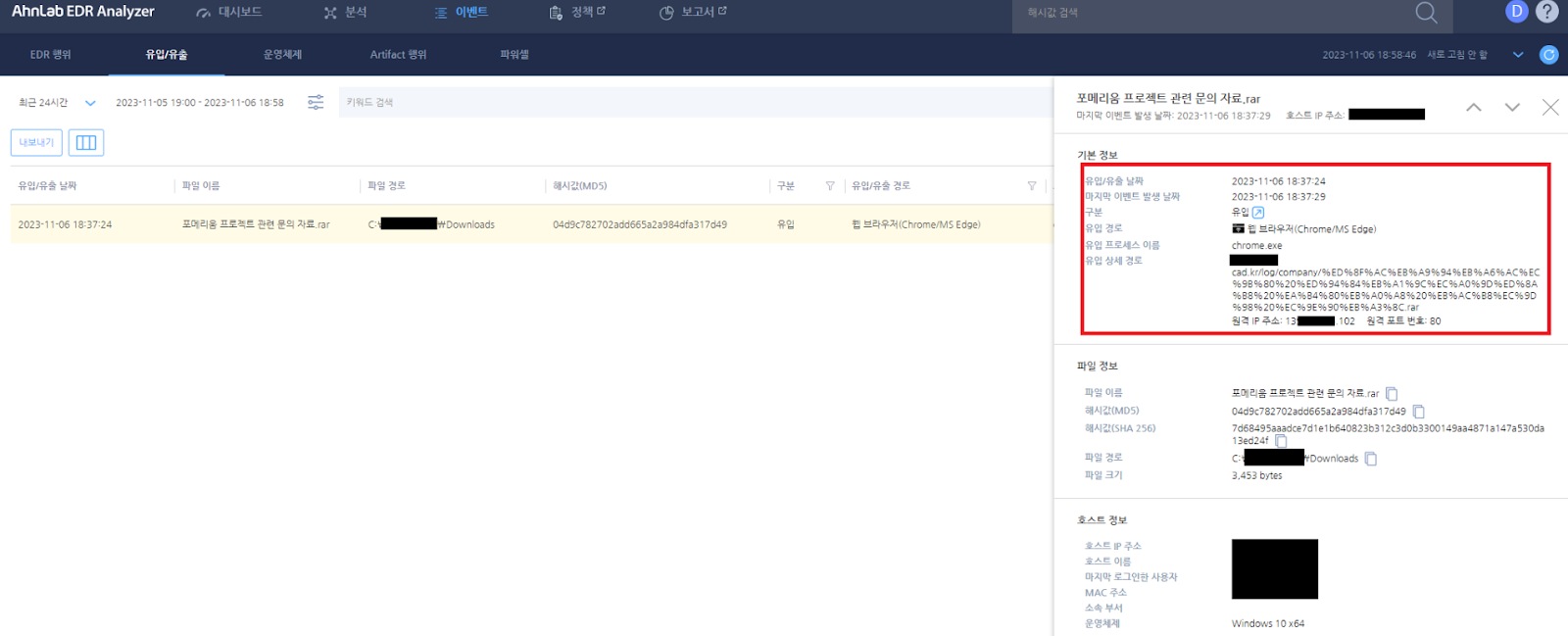
Infiltration & Exfiltration detection (Source – ASEC)
The decompressed downloaded file spawns a disguised .txt.lnk file with a Notepad icon that houses:-
-
A script
-
A CAB file
The LNK file triggers the HTML script via mshta, leading to obfuscated VBS script execution. Both mshta commands from LNK and decrypted VBS script commands within HTML run sequentially.
The key actions involve PowerShell reading LNK file, dropping the embedded CAB file, and executing it via expand process. Detection focuses on the expanded process of decompressing the dropped CAB file.
Decompressed CAB script exhibits malicious features that we have mentioned below:-
-
Executes another script
-
Gathers system data
-
Registers in autorun
-
Sends data
Further actions involve downloading files, decoding, and executing via a command-line program known as “certutil,” among other features.
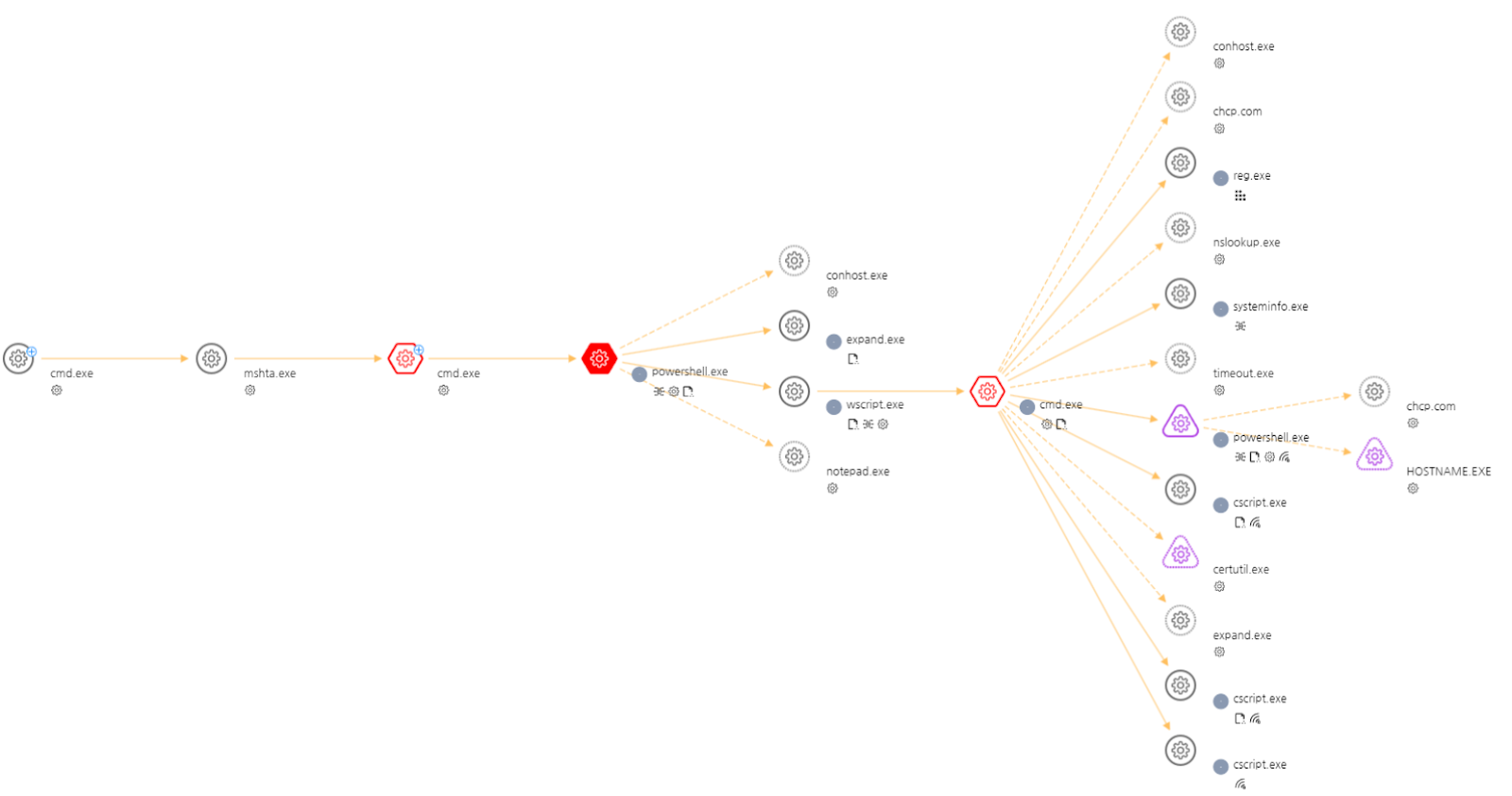
Distribution process (Source – ASEC)
Threat actors trick the users into executing files with diverse names on breached legit websites, and this makes the malware downloads hard to detect.
Activate behavior detection in V3 endpoint anti-malware to spot such distribution methods. However, if infected then make sure to analyze the details via EDR and take necessary security measures to mitigate the threat.
IOCs
[Behavior Detection]
-
Execution/MDP.Powershell.M2514
-
Injection/EDR.Behavior.M3695
-
Fileless/EDR.Powershell.M11335
[File Detection]
-
Downloader/BAT.Agent.SC194060
-
Infostealer/BAT.Agent.SC194061
-
Downloader/BAT.Agent.SC194060
[HASH]
-
04d9c782702add665a2a984dfa317d49
-
453e8a0d9b6ca73d58d4742ddb18a736
-
8f3dcf4056be4d7c8adbaf7072533a0a
-
c2aee3f6017295410f1d92807fc4ea0d