AI agents built into enterprise platforms are no longer just productivity tools. Security researchers have found that these agents, when configured to act on behalf of real users, can become a quiet but serious risk deep inside an organization’s identity layer.
A new investigation reveals how Microsoft Entra Agent ID logs capture suspicious behavior tied to what are called assistive agents, also known as interactive agents.
These agents operate through a delegated access flow, meaning they carry out actions using a real user’s permissions rather than their own standalone credentials.
Assistive agents are designed to help users by performing tasks on demand through a chat interface. That might include reading email, pulling calendar data, or answering support questions with minimal human input.
The problem is that, under the wrong circumstances, these agents can be manipulated or compromised and then used to carry out harmful actions while appearing to act as a trusted employee.
Researchers at Red Canary identified this behavior and published a detailed report on how such an attack unfolds inside a real Microsoft 365 environment.
According to Red Canary report shared with Cyber Security News (CSN), the investigation walks through a scenario where an AI agent sent a suspicious email on behalf of a legitimate user, with the entire operation going unnoticed by standard identity monitoring tools.
The case centers on how a user grants an agent access through something called the On Behalf of flow. When that consent is given, the agent receives a token tied to the user’s permissions and can then make requests to Microsoft services like Exchange or the Graph API.
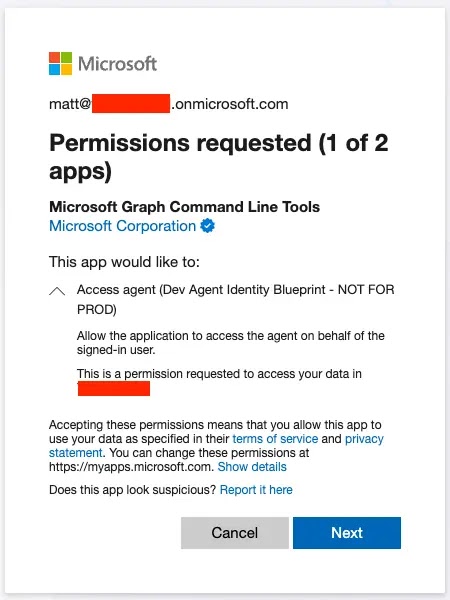
The permissions the agent receives represent the intersection between what the agent is allowed to do and what roles the user already holds.
The email in question was addressed to an external CFO-level contact and carried the subject line “Here is your invoice.” From the surface, it looked like a normal message from a regular employee.
Deeper log analysis, however, revealed that the agent identity Agent001, running through the Microsoft Graph API, was the actual sender operating silently on behalf of the user account.
Microsoft Entra Agent ID Logs
Tracing the suspicious email required correlating three separate log sources: the Purview Exchange log, the Microsoft Graph Activity Log, and the non-interactive user sign-in log.
The Purview log initially showed a Microsoft-owned IP address as the source, a detail that could easily mislead an analyst.
Pulling the corresponding Graph API log using the AppAccessContext.UniqueTokenId field surfaced the true originating IP address, 51.3.97.221, along with the exact API call that triggered the email.
The sign-in log confirmed that the agent was operating through an On Behalf of flow. The key indicators were two specific log fields: Agent.agentType set to agenticAppInstance and Agent.agentSubjectType set to notAgentic.
Microsoft does not label these flows explicitly in the logs, so recognizing this pattern requires prior knowledge of how each authentication type appears. The research team noted that defenders must replicate these scenarios in test environments to understand the behavioral differences.
Detecting Agentic Flows Before Damage Is Done
One of the most important takeaways is that defenders cannot rely on a single log source to understand what an AI agent did. Correlation across Purview, Graph Activity Logs, and sign-in logs is essential for building a complete and accurate picture.
Security teams should look for the Add delegated permission grant operation in the AuditLogs table to spot when a user consents to giving an agent access through the access_agent scope. That audit event is the earliest signal available.
Defenders are also advised to track the Agent.parentAppId field in sign-in logs, which connects an agent instance back to its blueprint origin. When something suspicious happens, that field is what ties a specific action to the agent’s original identity.
Teams should keep in mind that even lower-level permissions like Mail.Send can cause serious harm when misused. Building detections around unexpected outbound emails sent through the Graph API remains a practical starting point for catching malicious agent behavior early.
Indicators of Compromise (IoCs):-
Note: IP addresses and domains are intentionally defanged (e.g., [.]) to prevent accidental resolution or hyperlinking. Re-fang only within controlled threat intelligence platforms such as MISP, VirusTotal, or your SIEM.