A newly identified phishing campaign is using Google Cloud Storage to deliver Remcos RAT, a powerful remote access trojan, to unsuspecting victims across the globe.
Attackers are abusing the trust that users and security tools place in Google’s infrastructure, making this threat particularly hard to detect and block at the network level.
Phishing has always relied on deception, but this campaign takes it a step further by hosting a malicious HTML page directly on Google Cloud Storage, on the googleapis.com domain.
Since this is a legitimate and widely trusted Google service, most email security gateways and web filters do not flag the URL as suspicious.
Victims receive a phishing email containing a link that points directly to this Google-hosted page, which visually mimics the official Google Drive document-sharing interface.
The moment a user clicks through and interacts with the page, the infection process quietly begins in the background.
Their sandbox analysis confirmed that the attack chain is carefully structured to avoid raising red flags at each individual stage, from the initial phishing email delivery through to the final payload execution on the victim’s machine. Hosting malicious content on a trusted Google domain is the campaign’s most effective evasion strategy.
Remcos RAT is a commercially available remote administration tool developed by a company called Breaking Security.
While marketed for legitimate purposes such as remote device management and authorized penetration testing, cybercriminals have repeatedly weaponized it for surveillance, data theft, and maintaining long-term unauthorized access to compromised systems.
It has been actively used since 2016 and continues to receive regular updates, making it a persistent and evolving threat.
Once deployed, Remcos gives attackers full control over the infected machine — including the ability to log keystrokes, capture screenshots, manage files, and communicate back to a command-and-control server.
The potential impact of this campaign is wide. Any organization or individual who receives such an email and clicks the embedded Google Storage link can fall victim, regardless of their level of security awareness. Because the lure visually imitates familiar Google services, even moderately cautious users may not recognize the danger until it is too late.
Multi-Stage Infection Mechanism
The infection chain in this campaign is built across several deliberate stages, each designed to complicate detection and delay analysis. The process begins with a phishing email that carries a link to an HTML page hosted on googleapis.com.
This page is crafted to resemble a legitimate Google Drive file-sharing prompt, encouraging the user to click on what appears to be a shared document.
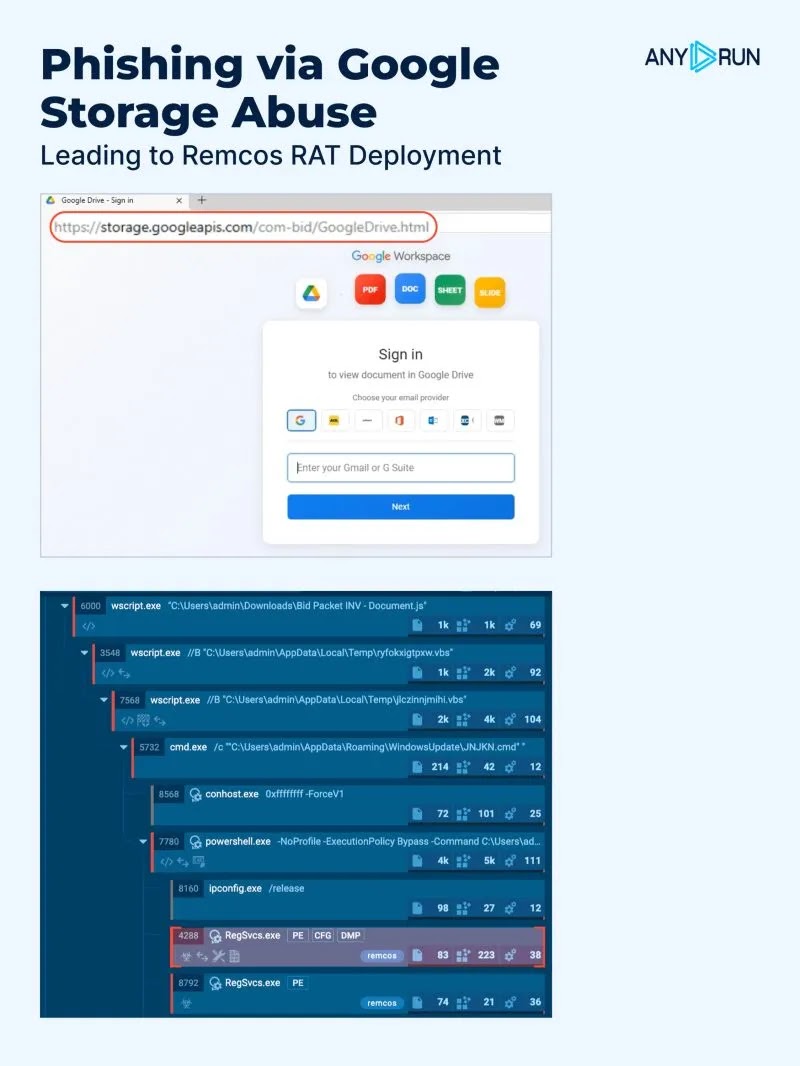
Once the user interacts with the page, a JavaScript-based redirect or automatic download is triggered, pulling a compressed or obfuscated archive from attacker-controlled infrastructure.
Inside this archive is a dropper component that executes silently through Windows scripting engines, typically VBScript or PowerShell.
This dropper then contacts a remote server to retrieve the final Remcos RAT payload, which is injected into a legitimate Windows process through process hollowing — a technique that allows the malware to run entirely within the memory space of a trusted system application, avoiding file-based detection.
Security teams are advised to monitor outbound connections to googleapis.com URLs that fall outside normal business workflows.
Enforcing script execution policies, enabling behavioral endpoint detection, and scanning all email links regardless of the destination domain are practical steps that significantly reduce exposure.
Users should be trained to avoid clicking links in unexpected emails, even when those links appear to lead to trusted platforms like Google Drive, and should confirm the sender’s identity through a separate channel before opening any shared file.