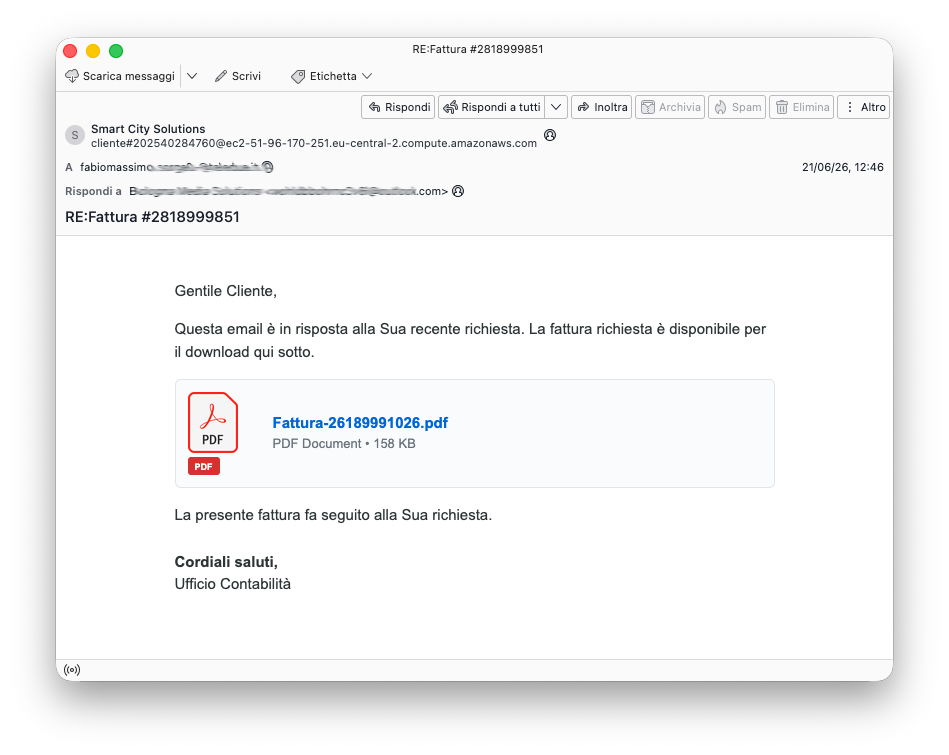
A newly discovered malware campaign has turned Google Chrome into a remote backdoor without breaking any of the browser’s built-in rules. Spotted in June 2026, the attack arrived in Italian-language phishing emails that looked like standard business invoices.
The email claimed a requested invoice was ready, signed off by an accounting office, and showed what appeared to be a legitimate PDF attachment waiting for download.
The real payload was hiding in plain sight. The downloaded file carried the name Fattura-2819889242.pfd.js, with the unusual extension clearly designed to mimic a PDF filename at a quick glance.
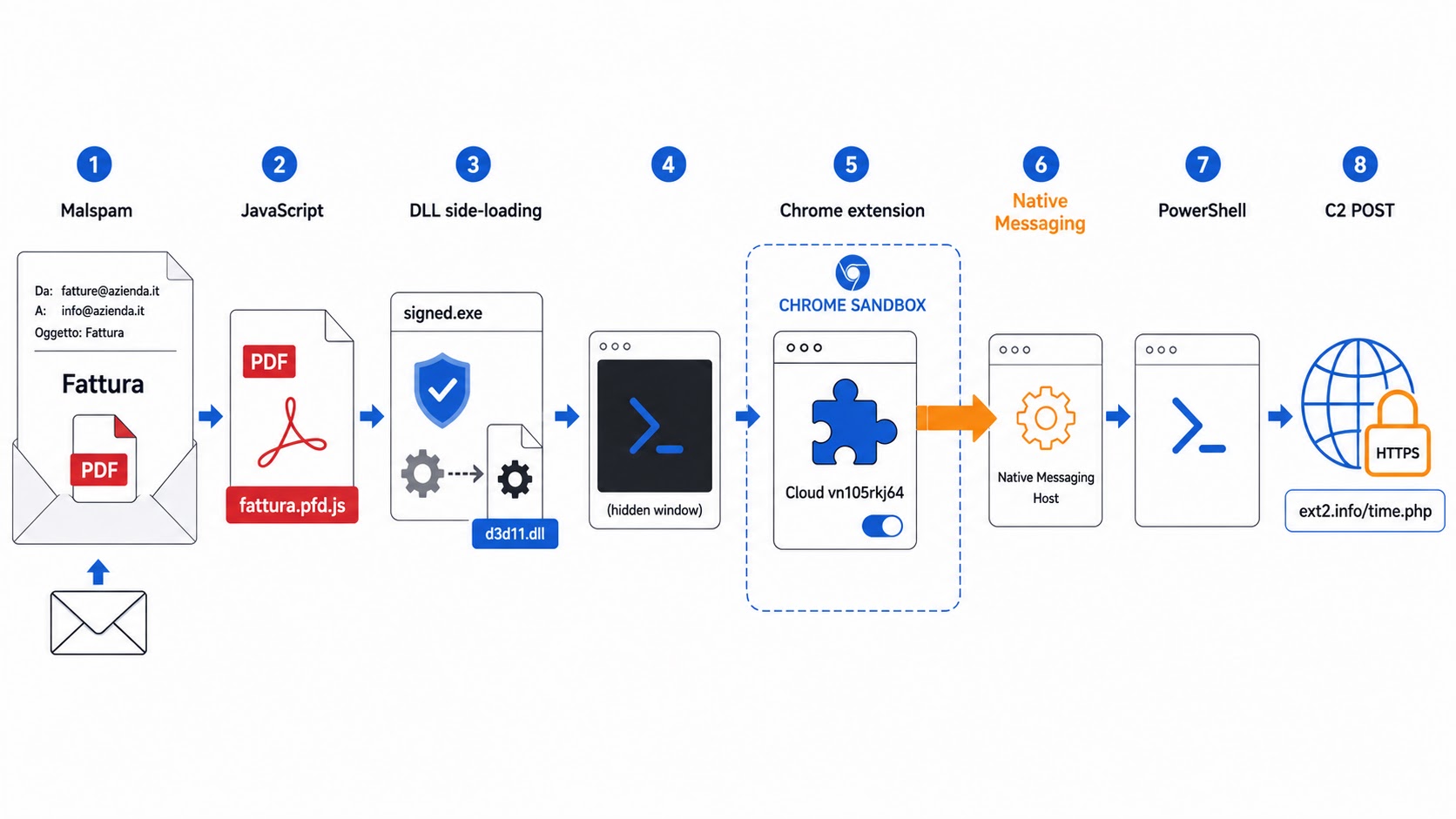
Once a victim ran the file, the Windows Script Host executed an obfuscated JavaScript that dropped two additional files into the user’s temporary folder. From that point, the infection moved fast and stayed hidden from view.
Analysts at D3Lab identified this campaign in a report shared with Cyber Security News (CSN). Their findings revealed that what set this attack apart from typical browser threats was not the phishing email but what the malware installed afterward.
The combination of a rogue Chrome extension and a Native Messaging Host gave attackers a persistent foothold that blended seamlessly into normal system activity.
The impact went beyond data theft. Attackers collected browser cookies, open tabs, URLs, and fingerprinting data from infected machines. A stolen authenticated cookie can allow an attacker to hijack an active session without ever needing the victim’s password.
Beyond cookie theft, the malware also worked as a full remote command tool, capable of running PowerShell instructions on the victim’s Windows system.
What makes this campaign particularly worrying is how it misused everyday technologies.
Signed applications, enterprise Chrome policies, and Native Messaging are tools organizations rely on routinely. The attackers combined them in a way that turned standard features into a fully functional attack chain.
Malicious Chrome Extension Uses Native Messaging Host
When the JavaScript file ran, it dropped two files: client_124578.exe and d3d11.dll. The executable was a legitimately signed file linked to EpicGames, making it appear trustworthy to most security tools.
The malicious d3d11.dll was loaded alongside it through DLL side-loading, where a trusted application unknowingly pulls in an attacker-controlled library due to how Windows resolves file dependencies.
The DLL launched a hidden PowerShell process that prepared the Chrome extension and modified Chrome’s enterprise policy settings.
The extension, named Cloud vn105rkj64, was registered under Chrome’s ExtensionInstallAllowlist and ExtensionInstallSources policy keys, making it appear as an admin-approved deployment.
This effectively bypassed the prompts that would normally alert a user to a new extension being installed.
Chrome extensions cannot directly run programs on a computer, which is a core part of the browser’s security design. However, Chrome supports Native Messaging, which allows extensions to communicate with a companion application already installed on the system.
The malware registered a Native Messaging Host that bridged the Chrome extension and Windows, letting the extension issue commands that ran entirely outside the browser sandbox.
Command Execution and What the Attackers Collected
Once the backdoor was active, the extension contacted ext2[.]info over HTTPS using POST requests. The first exchange sent a Google cookie, open tabs, URLs, browser language settings, and a victim identifier to the attacker’s server.
This gave attackers enough information to hijack active sessions and profile victims without ever knowing their password.
The attackers later sent a command that listed the full contents of the C drive, with the output returned through the same POST channel.
This confirmed the setup was not just a cookie stealer but a genuine remote-access backdoor. Blocking suspicious PowerShell activity alone would not stop the threat, since the control channel operated entirely inside the browser.
Defenders should audit unexpected Chrome enterprise policy entries, especially ExtensionInstallAllowlist and ExtensionInstallSources on unmanaged systems.
Native Messaging registrations should be cross-checked against approved software. Response teams must also clear the Native Messaging Host, review PowerShell logs, invalidate exposed sessions, and reset any credentials that may have been compromised.
Indicators of Compromise (IoCs):-
| Type | Indicator | Description |
|---|---|---|
| Email Subject | Fattura #2818999851 | Italian invoice lure used in phishing email |
| Displayed Filename | Fattura-26189991026.pdf | Document shown to victim in the email |
| Payload Filename | Fattura-2819889242.pfd.js | Obfuscated Windows JavaScript payload |
| MD5 | 61f07213f2e54c54ec379714fd211c73 | Hash of initial JavaScript payload |
| SHA-1 | d7a2361877b9cd1f4b6ef56f59fb7adec72cc945 | Hash of initial JavaScript payload |
| SHA-256 | b11ef9f11c9bb6228582f38a61f4c04dc7160939d8c5b7ee4e467ffde6317f02 | Hash of initial JavaScript payload |
| Dropped Filename | client_124578.exe | Signed application used for DLL side-loading |
| SHA-256 | e77747f06d1d3ee5b8466340a10416874439dd69a7e9cd8653647be7782899b6 | Hash of side-loading launcher |
| Dropped Filename | d3d11.dll | Malicious side-loaded DLL |
| SHA-256 | 94f333cba95e76e6b8c0f8831bffc446b5f3c90db2c598c6079a98f1a0ef9701 | Hash of malicious DLL |
| Chrome Extension Name | Cloud vn105rkj64 | Malicious Chrome extension name |
| Chrome Extension ID | gghagmhimhgfeajfdmjkgmmehbokmglg | Allowed extension origin identifier |
| SHA-256 | d05e03173d9c841a28af60f5dda8a7c7a39c0a0d7302ec412ac4638b8f9872a3 | Hash of extension CRX package |
| Native Messaging Host | com.vn105rkj64.tr7qprrt7g | Bridge between Chrome and Windows |
| C2 Domain | ext2[.]info | Confirmed command-and-control server |
| IP Address | 2.27.5.53 | Resolution observed during analysis |
| C2 Request | POST https://ext2[.]info/time.php?q=ste_jstest2 | Exfiltration and command channel |
| Related Domain | cd-nwlins[.]site | Contacted during execution; returned parked content |
| Registry Key | HKCU\Software\Policies\Google\Chrome\ExtensionInstallAllowlist | Extension installation policy modified by malware |
| Registry Key | HKCU\Software\Policies\Google\Chrome\ExtensionInstallSources | Observed value: http://localhost:8080/* |
| Registry Key | HKCU\Software\Google\Chrome\NativeMessagingHosts\com.vn105rkj64.tr7qprrt7g | Expected registration location for the host |
Note: IP addresses and domains are intentionally defanged (e.g., [.]) to prevent accidental resolution or hyperlinking. Re-fang only within controlled threat intelligence platforms such as MISP, VirusTotal, or your SIEM.