A fake Chrome browser extension pretending to be the popular TronLink crypto wallet has been caught stealing sensitive wallet credentials from unsuspecting users. The malicious extension operates silently in the background, harvesting mnemonic phrases, private keys, and passwords before forwarding them straight to attackers in real time.
This campaign is more dangerous than most because it does not look suspicious at first glance. The fake extension appeared on the Chrome Web Store with a claimed install count of over one million users and a 4.5-star rating backed by hundreds of reviews.
Many victims likely installed it without hesitation, believing it was a completely legitimate and widely used tool within the TRON ecosystem.
Analysts at SlowMist, a blockchain-focused security firm, identified and documented this threat after their MistEye monitoring system flagged the extension as a high-risk phishing sample.
The MistEye system triggered an immediate alert and notified clients once the fake extension and its connected phishing page were both confirmed. SlowMist published their findings to help the broader community identify and protect against this specific attack.
What makes this attack unusual is how the attackers likely took over an already popular and legitimate extension listing on the Chrome Web Store. By inheriting the store reputation of an existing extension, they avoided the hard work of building credibility from scratch. The displayed ratings and user counts belonged to the original listing, so nothing appeared forged on the surface.
The impact of this campaign can be severe and nearly immediate. Once a user enters their wallet credentials into the fake interface, those details are forwarded to attacker-controlled accounts without any delay. Any wallet accessed through this extension should be considered fully compromised, with digital assets at serious risk of theft.
MV3 Extension Impersonates TronLink
The attack works in two connected layers designed to stay hidden from security tools. The first layer is the Chrome extension itself, which appears to be a harmless blockchain explorer requesting only minimal permissions. The second layer is a remote phishing page that loads inside the extension popup and performs all the actual credential theft.
When a user installs the extension and clicks its icon, the popup quietly checks whether a remote server is available, then loads a phishing page inside an embedded frame. This page is a near-perfect copy of the real TronLink web wallet, and most users would not notice the difference.
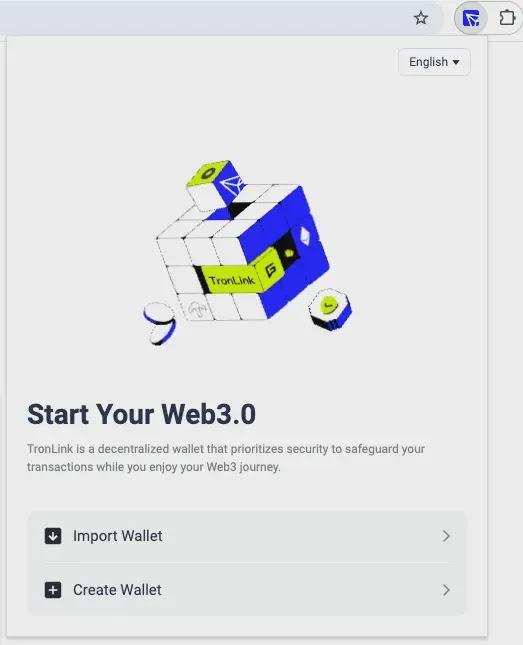
The extension also uses hidden Unicode characters and Cyrillic lookalike letters to make its name visually resemble “TronLink,” helping it slip past automated store review checks.
The phishing page collects every piece of sensitive data a user enters, including mnemonic phrases, private keys, keystore files, and passwords. It then packages this data and sends it directly to the attacker through the Telegram messaging platform, entirely without any visible sign to the victim.
Evasion Tactics and What Users Should Do
The attackers built several protection layers around their phishing page to obstruct security researchers. The page blocks right-clicking, disables text selection, intercepts developer tools shortcuts, and redirects suspected bots or analysts to a blank page.
It also uses geographic detection, automatically redirecting Russian-language users to a separate domain, likely to reduce the risk of drawing local law enforcement attention.
Users who installed this extension should remove it from Chrome immediately and clear all site data and local storage tied to it. If any wallet credentials were entered into the popup, those wallets should be treated as fully compromised, and all funds should be moved to a new wallet created on a trusted device right away.
Security teams are advised to block the domain tronfind-api.tronfindexplorer.com across DNS, proxy, and endpoint detection logs. Monitoring for traffic patterns targeting specific API paths used by the phishing backend can help detect exposure.
Restricting unapproved browser extensions through group policy or device management controls is a strong long-term step that meaningfully reduces this type of risk.
Indicators of Compromise (IoCs):-
| Type | Indicator | Description |
|---|---|---|
| Domain | tronfind-api[.]tronfindexplorer[.]com | Primary malicious domain; remote UI loading endpoint and credential theft backend |
| Domain | trx-scan-explorer[.]org | Secondary malicious domain; redirect target for Russian-region users |
| URL | https[:]//tronfind-api[.]tronfindexplorer[.]com/ | Remote phishing page root URL |
| URL | https[:]//tronfind-api[.]tronfindexplorer[.]com/api/data/words | Credential exfiltration endpoint |
| URL | https[:]//tronfind-api[.]tronfindexplorer[.]com/api/visitor/track | Visitor behavior tracking endpoint |
| URL | https[:]//tronfind-api[.]tronfindexplorer[.]com/api/visitor/create | Visitor creation endpoint |
| URL | https[:]//tronfind-api[.]tronfindexplorer[.]com/api/visitor/enrich | Visitor enrichment/blocking check endpoint |
| URL | https[:]//tronfind-api[.]tronfindexplorer[.]com/api/visitor/sync | Visitor sync/blocking check endpoint |
| Telegram chat_id | 8334454422 | Attacker-controlled Telegram account receiving stolen credentials |
| Chrome Extension ID | ekjidonhjmneoompmjbjofpjmhklpjdd | Malicious extension ID on Chrome Web Store |
| MD5 | ce612d027e631d6633582227eb29002f | Hash of malicious extension file |
| SHA1 | 94d651b42355f2b0765a7435e5a5927623807225 | Hash of malicious extension file |
| SHA256 | 6b4a4b64e6f969017cb3a9a71dd3038ddf32b989e5342dbbe36650d5802f2ee4 | Malicious file: index.html |
| SHA256 | b84b89f0a1b7f00431274ac676104acaaa73d440e5731161d1077e733014cc29 | Malicious file: 27-a530a8c5aa9059e0.js |
| SHA256 | 0cbf4f21cf157227d2c3fba80b64e1f4c3f9d2cc0bf926e024252c35e93edd5a | Malicious JavaScript file (filename not specified) |
| Filename | index.html | Malicious extension popup entry file |
| Filename | assets/index.html-2KXeQB-c.js | Core malicious JavaScript logic file within extension package |
| Filename | 27-a530a8c5aa9059e0.js | Malicious JavaScript file associated with phishing page |
Note: IP addresses and domains are intentionally defanged (e.g., [.]) to prevent accidental resolution or hyperlinking. Re-fang only within controlled threat intelligence platforms such as MISP, VirusTotal, or your SIEM.