A DMARC analyzer turns raw email reports into prioritized actions that harden domain protection.
By combining DMARC monitoring with a capable DMARC report analyzer, security and messaging teams can see who is sending on behalf of their domains, whether messages authenticate, and how to move safely from monitoring to enforcement.
This visibility is essential for phishing defense: it identifies spoofed traffic, highlights gaps in SPF and DKIM, and guides corrective steps before attackers abuse your brand.
Phishing defense and domain protection
Phishing campaigns thrive on lookalike domains and unauthorized use of your sending identity.
Ongoing DMARC monitoring plus a DMARC report analyzer surfaces unauthorized sources quickly in DMARC aggregate reports and forensic data, so you can quarantine or reject abuse with confidence.
Modern platforms add reputation monitoring, blacklist monitoring, and threat intelligence to correlate hostile infrastructure and reduce risk across your mail flow.
Brand trust, BIMI, and VMC
A strong email authentication posture—valid SPF, aligned DKIM, and an enforced DMARC record—supports BIMI, which can display your logo in inboxes.
With a Trusted Verified Mark Certificate (VMC), aligned authentication and a p=quarantine or p=reject policy, brands improve recognition and trust for major mail receivers like Gmail and Yahoo.
Some providers include a CMC Simulator to validate logo rendering before rollout, and hosted DMARC services simplify prerequisites alongside MTA-STS and TLS-RPT reporting.
A good DMARC analyzer helps organizations identify email authentication issues quickly and improve their domain security.
Deliverability and sender reputation
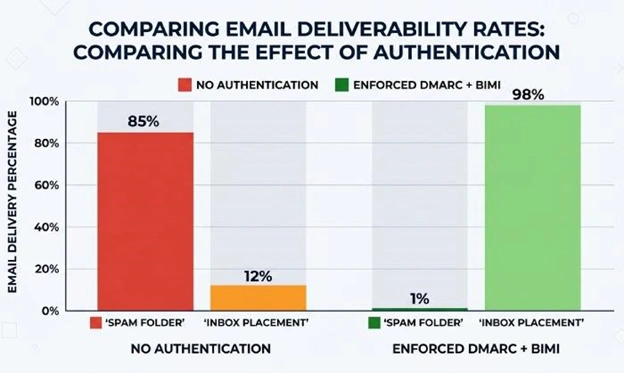
Mailbox providers reward authenticated mail. A DMARC analyzer highlights authentication rates across Gmail, Yahoo, and other mail receivers, so you can tune infrastructure and integrations to protect deliverability.
As you progress from p=none to p=quarantine and eventually p=reject, the right DMARC report analyzer normalizes aggregated reports, shows message volume trends, and maps where alignment fails.
Reputation and blacklist diagnostics
Delivery Center-style dashboards and diagnostics help you pinpoint issues: sudden message volume spikes from a new IP, misconfigured SPF includes, or DKIM selector problems.
With IP address aggregation, a DMARC XML parser groups sending IPs by provider, while blacklist monitoring and Email Health checks (e.g., via MXToolbox SuperTool with DNS Lookup, MX Lookup, Blacklists) surface risks that indirectly affect inbox placement.
DMARC 101: how SPF, DKIM, and alignment work together
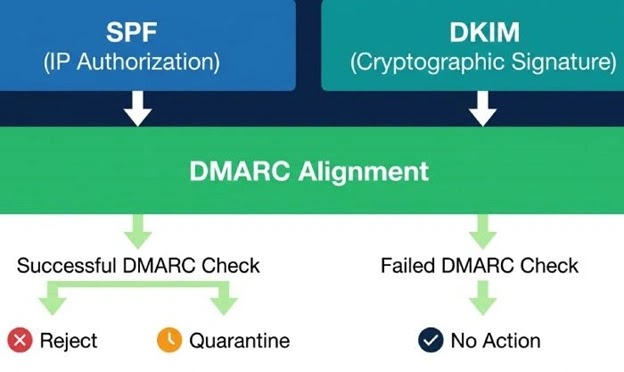
DMARC builds on existing email authentication standards. SPF confirms whether a sending server’s IP is allowed to send for your domain.
DKIM validates that a message was cryptographically signed by an authorized key and that headers remained intact. DMARC alignment requires that the visible From domain matches (or is a subdomain of) the domain authenticated by SPF or DKIM.
SPF, alignment modes, and analytics
SPF checks the path that handled delivery. If bounce handling or forwarding breaks alignment, DMARC may still pass via DKIM—hence the need for both.
A DMARC analyzer correlates SPF pass/fail with alignment to show where enforcement might fail. Detailed SPF analytics reporting and an SPF checker catch issues like too many DNS mechanisms, flattened records, or missing includes.
Many teams use a hosted DMARC platform with an SPF generator to safely update records and validate changes with DNS Lookup before going live.
Practical SPF insights
- Keep the SPF record under DNS lookup limits and test changes in a staging subdomain.
- Use a domain analyzer to inventory all senders that require inclusion.
- Compare provider guidance (e.g., PowerDMARC or MXToolbox) with your DMARC AI Agent recommendations for safer rollouts.
DKIM keys, selectors, and alignment
DKIM proves message integrity with a domain-bound signature. The DMARC report analyzer reveals which selectors sign reliably and where key rotation fails.
DKIM analytics reporting and a DKIM checker highlight alignment breaks caused by intermediaries or vendor misconfigurations. A DKIM generator in your hosted DMARC stack can create appropriate key sizes and roll selectors on a schedule.
Practical DKIM insights
- Use 2048-bit keys where supported; rotate selectors periodically.
- Confirm header canonicalization with an Email Header Analyzer to prevent signature breaks.
- Align the d= domain in DKIM with the visible From to satisfy DMARC alignment.
Getting started: publishing records and onboarding domains in a DMARC analyzer
A successful rollout begins with a correct DMARC record at p=none to enable visibility without impacting mail flow. From there, iterate toward enforcement as your DMARC analyzer validates legitimate sources and isolates spoofing.
Publish and validate your DMARC record
Use a DMARC generator to build a policy with mailto: addresses for RUA (aggregate) and RUF (forensic) destinations.
Hosted DMARC services streamline mailbox setup, retention, and secure handling of sensitive data. Validate with a DMARC checker, and verify related controls with a TLS-RPT checker, SPF checker, and DKIM checker.
Many teams rely on platform features like an interactive tour or self service tour to ensure settings for rua=, ruf=, fo=, pct=, and aspf/adkim are correct.
DNS and adjacent controls
- Confirm via DNS Lookup that TXT records for SPF, DKIM, and DMARC resolve globally.
- Add MTA-STS and TLS-RPT reporting to harden transport security, visible within Delivery Center-style dashboards.
- Prepare for BIMI by meeting DMARC enforcement (quarantine or reject) and obtaining a VMC; validate with a lookalike domain checker, DNSSEC checker, and CAA checker to round out brand and transport assurances.
Onboard domains, integrations, and governance
Bring each sending domain and subdomain into your hosted DMARC platform. Use a domain analyzer and API-driven onboarding to fetch configurations at scale, aided by developer tools and an API Reference.
Integrations connect ESPs, CRMs, and marketing systems so the DMARC report analyzer can correlate vendor traffic to known sources.
Programs and services to accelerate success
- Partners program options (Reseller Program, OEM Partner Program, MSP/MSSP Program) help service providers deliver deployment services, managed services, and support services.
- OEM, MSP, and MSSP models leverage Threat Intelligence Service Feeds and platform features like diagnostics and a centralized Delivery Center.
- An OEM-style integration can embed DMARC monitoring and parsing DMARC reports directly into your existing delivery center or email security stack.
Making sense of DMARC data: decoding aggregate (RUA) and forensic (RUF) reports
DMARC aggregate reports (RUA) are machine-readable XML email reports sent by mailbox providers that summarize authentication results for your domain over a period (typically daily).
Forensic reports (RUF) provide copies or headers of individual failures. A modern DMARC analyzer automates parsing DMARC reports, correlates them with known senders, and recommends policy moves.
Aggregate (RUA) and forensic (RUF) explained
RUA aggregated reports show message volume, pass/fail counts, and alignment outcomes by source IP and sending domain.
A DMARC XML parser turns those XML files into searchable dashboards that support IP address aggregation, normalize provider fields, and highlight anomalies.
The DMARC report analyzer blends these insights with authentication rates to show readiness for p=quarantine or p=reject. RUF offers deep diagnostics—often redacted—useful for investigations guided by an Email Header Analyzer.
Parsing and operationalizing insights
- Automate parsing DMARC reports to avoid gaps from manual handling, and store aggregated reports for trend analysis.
- Align RUA insights with SPF analytics reporting and DKIM analytics reporting to see which control carries alignment for each sender.
- Use the DMARC checker regularly after changes, and re-run the DMARC generator when adding new RUA/RUF mailboxes or adjusting policies in your hosted DMARC environment.
Mapping your sender ecosystem: discovering and validating all legitimate sources
Your DMARC monitoring program should inventory every legitimate sender: corporate outbound gateways, marketing platforms, CRM automation, ticketing tools, HR systems, and third-party vendors.
A DMARC analyzer surfaces unknown IPs and hosts in aggregated reports, correlating them back to vendors via reverse DNS, MX Lookup, and threat intelligence.
From discovery to enforcement
- Use IP address aggregation to cluster traffic by provider; validate ownership with vendor documentation, SPF includes, and DKIM selectors.
- Track message volume and authentication rates for each source; require vendors to maintain aligned SPF/DKIM. Mail receivers like Gmail and Yahoo provide rich signals in email reports.
- Leverage integrations, developer tools, and an API to synchronize sender inventories; an OEM integration can feed your delivery center or SIEM.
- Before moving to quarantine and reject, run a staged ramp-up (pct=) and verify improvements with diagnostics, blacklist monitoring, and Email Health checks via MXToolbox SuperTool.
Tooling that accelerates mapping
- A robust hosted DMARC stack combines a DMARC analyzer, DMARC report analyzer, DMARC XML parser, DMARC checker, and DMARC generator to keep configuration and visibility in lockstep.
- Add a DKIM generator and SPF generator to provision keys and records systematically; confirm alignment with a DKIM checker and SPF checker.
- Supplement with Domain Analyzer, Email Header Analyzer, and DNS Lookup utilities; consider MXToolbox and PowerDMARC resources for quick triage.
- Use TLS-RPT reporting and MTA-STS telemetry to ensure secure transport alongside authentication; verify with a TLS-RPT checker.
- For executive and provider stakeholders, platform features like an interactive tour, Delivery Center dashboards, and a DMARC AI Agent help translate technical email reports into business-level risk and readiness metrics.