A recent intrusion uncovered by security researchers revealed a calculated attack campaign that used a legitimate enterprise management tool as a weapon.
The threat actor gained access through a compromised third-party IT services provider, then quietly moved through the victim’s environment using tools that were already approved and running.
No obvious malware was dropped, and no loud alerts were triggered at any stage of the attack.
Microsoft Incident Response investigators analyzed the full attack chain and published their findings, noting that the campaign abused the HPE Operations Agent (OA), a widely used enterprise monitoring tool, as its primary delivery mechanism.
Microsoft said in a report shared with Cyber Security News (CSN) that the abuse did not involve any flaw or vulnerability in HPE OA itself.
The tool was simply weaponized because it already had legitimate and trusted access across the target environment.
The campaign stretched across more than 100 days, from the initial compromise to the moment incident response was finally engaged.
Attackers Using Trusted HPE Operations Agent
During that time, the attackers harvested credentials, moved laterally across sensitive systems including domain controllers and SQL servers, and set up covert tunnels using ngrok to maintain persistent access without being detected.
Since all activity flowed through a trusted management channel, it blended seamlessly with routine administrative work and stayed off the radar for an extended period.
The scale and patience of this campaign highlight a broader shift in how sophisticated attackers operate today.
They are no longer measured by the sophistication of their malware but by how effectively they can disappear inside a trusted environment and remain there undetected for months.
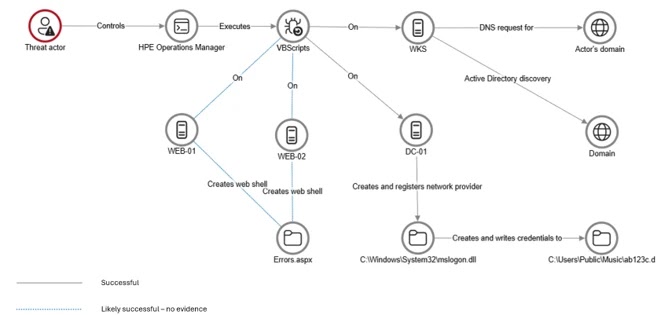
The threat actor exploited the trust placed in HPE Operations Manager (HPOM), which was managed by a third-party IT services provider on behalf of the targeted organization.
From that position, the attacker pushed VBScripts, specifically a file named abc003.vbs, to multiple servers including web servers and domain controllers across the environment.
These scripts quietly gathered system information, mapped the network, and performed Active Directory discovery.
Since the scripts ran through an approved and signed management platform, no security tool raised a flag.
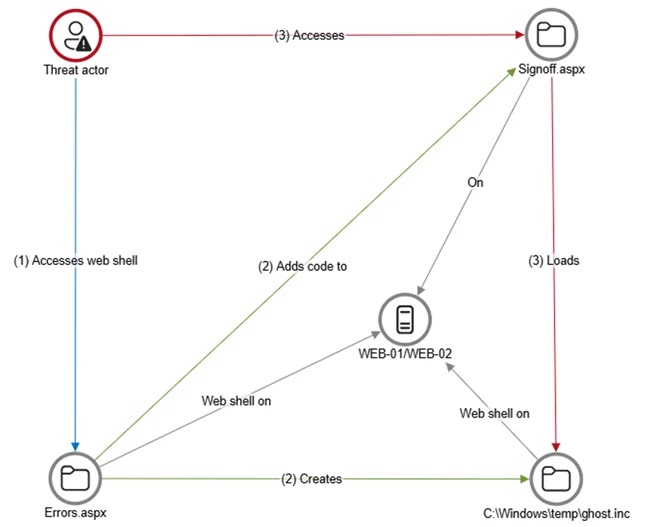
The attacker also deployed web shells named Errors.aspx and a modified Signoff.aspx on internet-facing servers, creating persistent backdoors that stayed active even if other individual tools were discovered and removed from the system.
Credential Theft and Lateral Movement Tactics
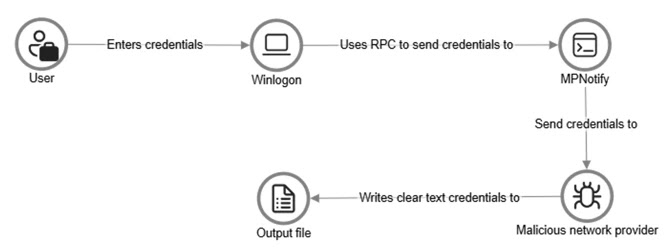
Once inside, the attackers turned their focus to stealing credentials directly at the source. They registered a malicious network provider DLL called mslogon.dll on domain controllers, which hooked into the Windows authentication process and captured usernames and passwords in plain text every time a user signed in or changed their password.
Stolen credentials were quietly saved to a file path inside a public music folder, making them easy to retrieve later without drawing any attention.
Later in the campaign, a password filter DLL called passms.dll was also registered on two domain controllers, intercepting credentials at the system level whenever a password was modified.
A companion module called msupdate.dll worked alongside it to transfer captured data over a network file share and even had the ability to email stolen credentials out under the subject line “Update Service.”
The attacker also deployed ngrok on internal servers to create encrypted tunnels, enabling Remote Desktop Protocol sessions without needing to expose firewall ports.
Microsoft recommends that organizations deploy endpoint detection and response (EDR) tools across all devices and apply a default-deny model for outbound traffic to block unauthorized connections.
They also advise enabling detailed logging on web servers, removing unnecessary tools and software that could be abused, and actively monitoring for unexpected changes in authentication configurations such as LSA notification packages and network provider registrations to catch this type of stealthy abuse before it causes further damage.
Indicators of Compromise (IoCs):-
| Type | Indicator | Description |
|---|---|---|
| File Name | abc003.vbs | VBScript deployed via HPE Operations Manager for system, network, and AD discovery |
| File Name | Errors.aspx | Initial web shell deployed on internet-facing web servers WEB-01 and WEB-02 |
| File Name | Signoff.aspx | Legitimate application page modified to load a secondary web shell |
| File Name | ghost.inc | Secondary web shell loaded from the Windows temporary directory |
| File Name | mslogon.dll | Malicious network provider DLL registered on domain controllers to capture plaintext credentials |
| File Name | passms.dll | Malicious password filter DLL registered on DC01 and DC02 to intercept credentials during password changes |
| File Name | msupdate.dll | Companion module that transferred encoded credential data via SMB and email exfiltration |
| File Path | C:\Users\Public\Music\abc123c.d | File path where cleartext credentials captured by mslogon.dll were stored |
| File Path | C:\ProgramData\WindowsUpdateService\UpdateDir\Ipd | File path where encoded credential data captured by passms.dll was written |
| File Name | icon02.jpeg | File name used to disguise exfiltrated credential data written to remote SMB shares |
| Tool | ngrok | Legitimate tunneling tool abused to expose internal servers via encrypted RDP tunnels |
| Email Subject | Update Service | Subject line used by msupdate.dll for outbound credential exfiltration via SMTP |
Note: IP addresses and domains are intentionally defanged (e.g., [.]) to prevent accidental resolution or hyperlinking. Re-fang only within controlled threat intelligence platforms such as MISP, VirusTotal, or your SIEM.