A large-scale automated password spray campaign is actively abusing Microsoft’s Azure Command-Line Interface (CLI) and legacy OAuth flows to compromise Entra ID accounts, despite organizations having multi-factor authentication (MFA) in place.
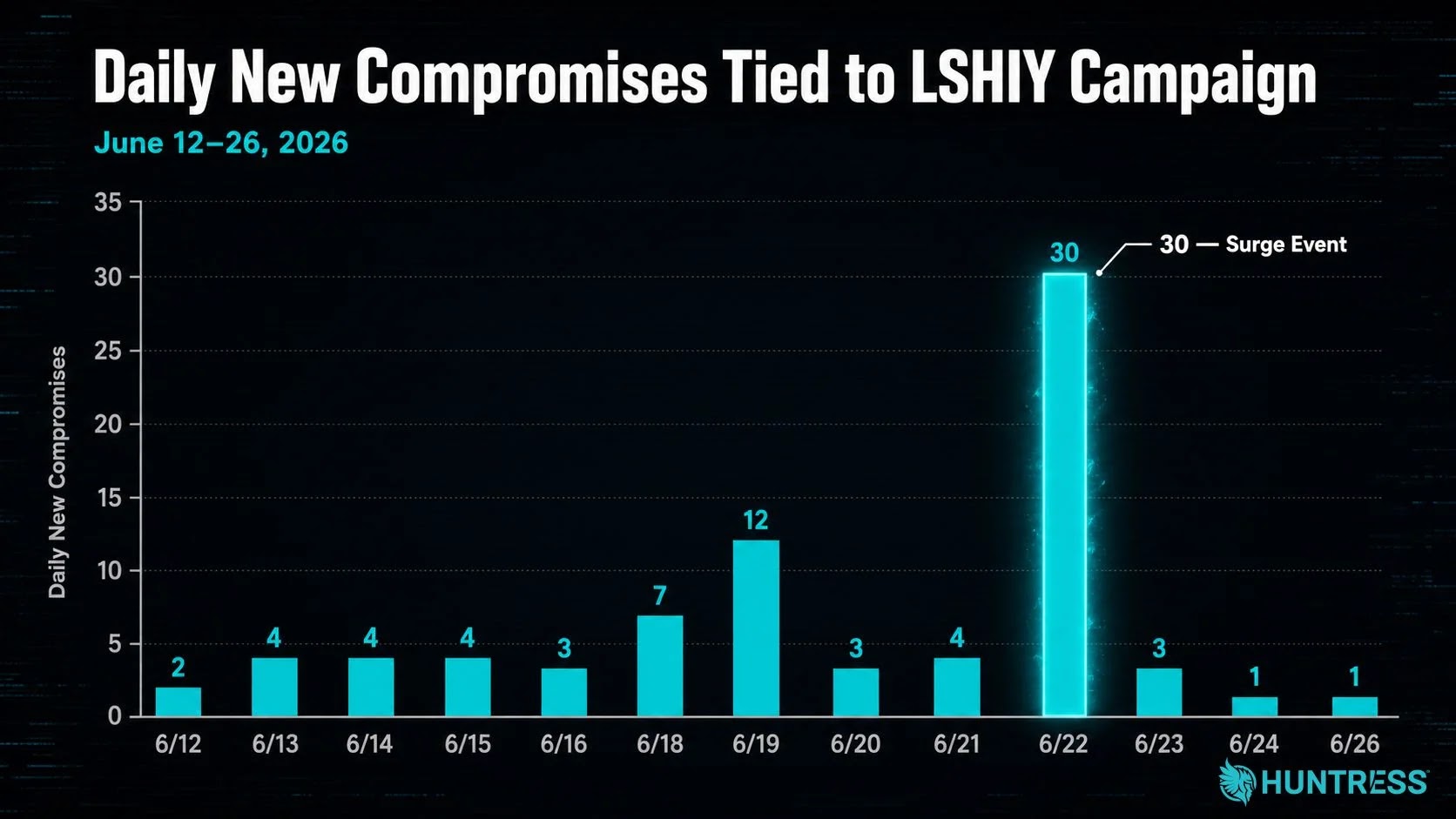
Huntress is tracking a sustained password-and-token spray campaign targeting Microsoft 365 and Azure CLI logins, with activity spiking between June 12 and June 26, 2026.
During this 14‑day window, the actor attempted more than 81 million logins against Huntress customer tenants and successfully compromised at least 78 Microsoft accounts across 64 organizations.
Daily compromises initially remained low, typically two to four accounts per day, before surging to 30 user identities across 23 businesses on June 22, marking a clear escalation event in the campaign.
The activity is part of a broader trend: Huntress reports that credential spray volume across its customer base has increased by more than 155× over the past six months, with a current mean of about 1,964 failed attacks per tenant per month and a median of 804.
Target selection appears to be driven by password prevalence in existing combo lists rather than by industry or vertical, indicating opportunistic abuse of previously breached, unrotated credentials.
The bulk of observed attack traffic originates from IPv6 address range 2a0a:d683::/32, announced under autonomous system AS32167 and attributed to internet infrastructure provider LSHIY LLC. LSHIY operates at least two ASNs—AS32167, registered in June 2021, and AS955, registered in June 2022—with third‑party telemetry consistently associating their IPv6 prefixes with Chinese origin.
Corporate registration records link LSHIY to factory addresses in Hong Kong and Wuhan, as well as a shared office space at 42 Broadway in New York, a setup that obscures true operational ownership. Huntress has submitted abuse reports to LSHIY regarding the observed activity but has not yet received a response.
The threat actor is replaying old username–password pairs exposed in prior breaches but never rotated and validating them via the OAuth Resource Owner Password Credentials (ROPC) flow used by Azure CLI.
ROPC, deprecated in OAuth 2.1, exchanges a raw username and password directly at the token endpoint and mints user‑delegated access tokens without an interactive authorization step. Because Conditional Access Policies (CAPs) typically enforce MFA at the authorization endpoint, ROPC can bypass poorly configured policies, resulting in successful token issuance with no MFA challenge.
Huntress found that many impacted tenants had MFA and CAP deployed but with critical configuration gaps. Common failure modes included scoping MFA to specific cloud apps instead of “All Cloud Apps,” enforcing MFA only for privileged groups such as administrators, restricting MFA to non‑trusted locations, and leaving policies in report‑only mode.
In several cases, geolocation inconsistencies mislabeled attacking IPs as U.S. addresses, allowing them to slip past “trusted location” logic even though other telemetry placed them in China.
| Misconfiguration type | Effect on attack | Why it failed against Azure CLI |
|---|---|---|
| MFA only for specific apps | Azure CLI sign‑ins not covered | CAP never evaluated Azure CLI as an enforced app. |
| MFA only for certain groups | Non‑admin identities unprotected | Spray focused on users outside protected groups. |
| MFA only for non‑trusted locations | Geo‑mislabeled IPs treated as trusted | Inaccurate IP geolocation bypassed location conditions. |
| Report‑only CAP policies | No actual blocking or prompts | Policies logged events but did not enforce controls. |
| Legacy ROPC left enabled | MFA not invoked on token endpoint | ROPC never hit the authorization endpoint where CAP runs. |
Mitigations
Huntress and other researchers recommend that organizations treat Azure CLI and ROPC as high‑risk surfaces and adjust CAP configurations accordingly.
Administrators should require MFA or outright block access for All users, All cloud apps, and All client app types, and enforce strong authentication at the client level (for example, using the userStrongAuthClientAuthNRequired setting) to prevent ROPC‑based token grants. Where feasible, Azure CLI should be restricted to non‑admin users who actually need it, or explicitly blocked via dedicated CAP rules.
Beyond ROPC, organizations should disable legacy grants and authentication protocols, tighten named locations, and continuously test CAP behavior using tools like Microsoft’s “What If” simulator to identify report‑only or excluded policies.