Windows 11 Pro represents the professional iteration of Microsoft’s operating system, tailored for discerning users and corporate clientele.
It distinguishes itself from its basic counterpart, Windows 11 Home, by offering an expanded array of security features, remote work, and management tools, as well as seamless integration with domains and group policies.
In this article, our goal is to provide a detailed guide on how to select and buy Windows 11 Pro, unlocking the full spectrum of features and capabilities inherent in this operating system.
Advantages Of Windows 11 Pro
Let us delve into the distinguishing features that set Windows 11 Pro apart from the standard version:
-
Enhanced security features: For instance, BitLocker encryption ensures robust protection for files stored on computer disks from unauthorized access. Additionally, the Windows Hello feature facilitates swift biometric authentication, be it through facial recognition or fingerprints.
-
Integration with Active Directory domains and group policy management: This facilitates streamlined computer administration within corporate settings.
Furthermore, Windows 11 Pro incorporates certain components from Windows Server, along with advanced performance monitoring and optimization tools such as Task Manager.
This empowers seasoned users to fine-tune the OS to suit specific requirements and tasks.
Overall, this OS iteration is tailored to cater to the demands of the corporate segment, aiming to provide a high level of security, convenience for remote work, and heightened productivity.
While pertinent for home users as well, it is prudent to ascertain the significance of the additional features for which you are paying.
Requirements And Compatibility
What hardware prerequisites does Windows 11 Pro necessitate for your computer? It is imperative to comprehensively understand these prerequisites to make an informed decision.
Firstly, let us consider the PC hardware requirements:
-
Processor: A minimum of 1 GHz is required, with 2 GHz recommended, and featuring 2 or more cores. Support for the x64 instruction set is mandatory.
-
RAM: A minimum of 4 GB is necessary, with 8 GB preferred.
-
Hard disk: At least 64 GB of capacity is required for system installation, along with additional space for user data.
-
Graphics card: DirectX 12 compatibility is essential, coupled with a WDDM 2.0 driver or higher.
Additionally, a monitor with a minimum resolution of 720p is requisite, with a graphics card memory capacity of at least 2 GB being desirable.
Furthermore, TPM 2.0 (Trusted Platform Module) and support for UEFI and Secure Boot are obligatory.
If your computer satisfies the aforementioned requirements or is primed for minor component upgrades, you can confidently contemplate the installation of Windows 11 Pro.
Where To Acquire A Windows 11 Pro Product Key
It is pertinent to note that purchasing a product key directly from Microsoft can be financially burdensome. Offers from partners and reputable platforms present a more attractive proposition in terms of pricing.
Particularly noteworthy sources include:
-
Reliable online stores: Numerous platforms online specialize in vending keys for Microsoft products. However, it is advisable to opt for reputable platforms that collaborate directly with the manufacturer or its official distributors. This ensures the authenticity of the keys. The benefits of such online stores encompass reasonable pricing, convenient online transactions, and prompt delivery of the key via email.
-
Local retailers: Often, these entities procure keys in bulk and can extend discounts. Moreover, the presence of a product key is corroborated by a paper certificate. However, drawbacks may include a limited assortment and relatively higher prices compared to their online counterparts.
Alternatively, purchasing a key via marketplaces may offer lower prices, albeit at the expense of an increased risk of procuring non-genuine or previously activated products.
When selecting a specific vendor, place reliance on reviews, ratings, and certifications. This mitigates the risk of acquiring counterfeit products.
Additionally, meticulously peruse the terms and conditions, encompassing the warranty period, possibility of return, and support channels.
Activating Windows 11 Pro
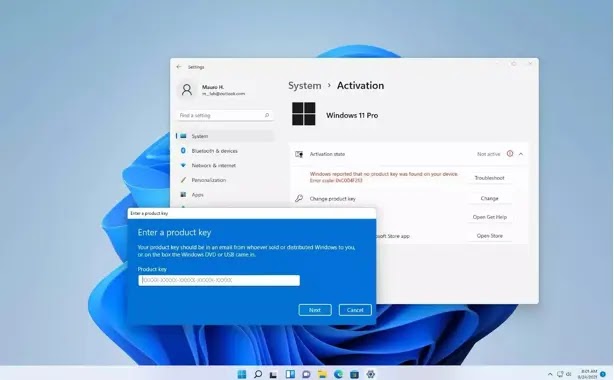
Upon receipt of the key, you can initiate the activation process for the OS. To proceed, navigate to Windows settings and select the “Activation” section.
Subsequently, click the corresponding button to update the product code (or enter the key for the initial time). In the ensuing window, input the 25-character key and proceed by clicking the subsequent button.
The system will autonomously authenticate the code, culminating in the activation of Windows 11 Pro.
All prerequisites are now fulfilled! You can now capitalize on all the advantages bestowed by this professional rendition of Windows.
In the event of an activation error, ascertain the accuracy of key entry and the availability of an internet connection. In complex scenarios, it is prudent to avail oneself of support services.
Armed with this information, you can confidently ascertain the necessity of transitioning to Windows 11 Pro, predicated on the intricacies of PC usage and associated tasks.
Moreover, in the event of necessity, acquiring a product key is facile, accompanied by savings, and devoid of the risk of encountering malicious entities.