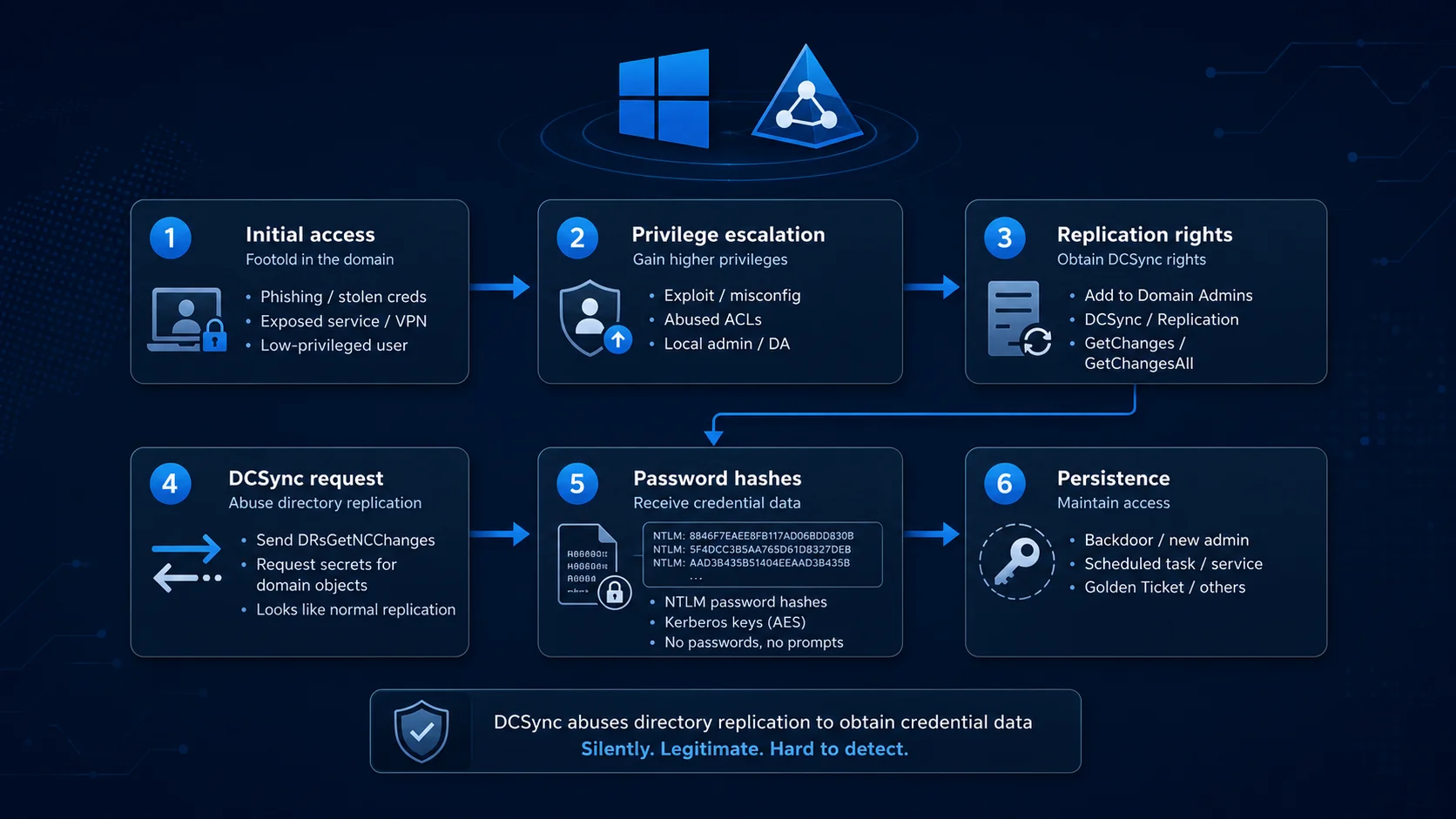

Active Directory is the beating heart of identity in most enterprises, and its single most valuable secret is the password hash of every user, service, and machine account.
A DCSync attack lets an adversary walk out with those hashes without ever logging into a domain controller, dropping a tool on it, or reading the NTDS.dit database off disk. Instead, the attacker simply asks a domain controller to hand the secrets over, using the very same replication protocol that domain controllers use to synchronize with one another.
Technically, DCSync impersonates a domain controller and issues a directory-replication request over the Microsoft Directory Replication Service Remote Protocol (MS-DRSR).
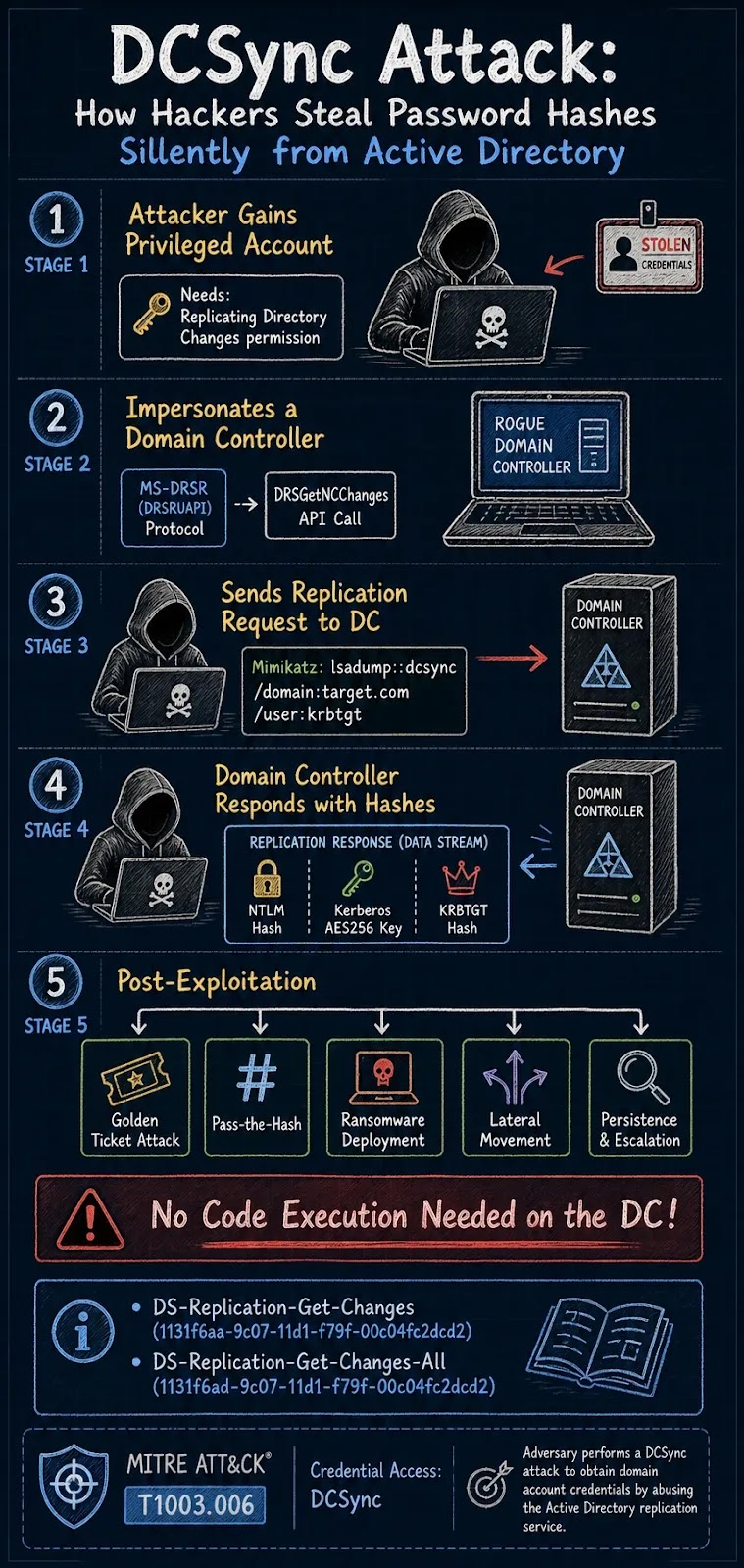
It binds to the DRSUAPI RPC interface and calls IDL_DRSGetNCChanges to request the credential attributes of one account, a handful, or every account in the domain. The domain controller, believing it is talking to a peer DC, replies with NTLM hashes, Kerberos keys, and password history.
First weaponized in Mimikatz by Benjamin Delpy and Vincent Le Toux, DCSync is now a standard move in nearly every ransomware and nation-state playbook. MITRE ATT&CK catalogs it as T1003.006 (OS Credential Dumping: DCSync).
For a broader view of where it fits in an intrusion, see the Active Directory Attack Kill Chain Checklist.
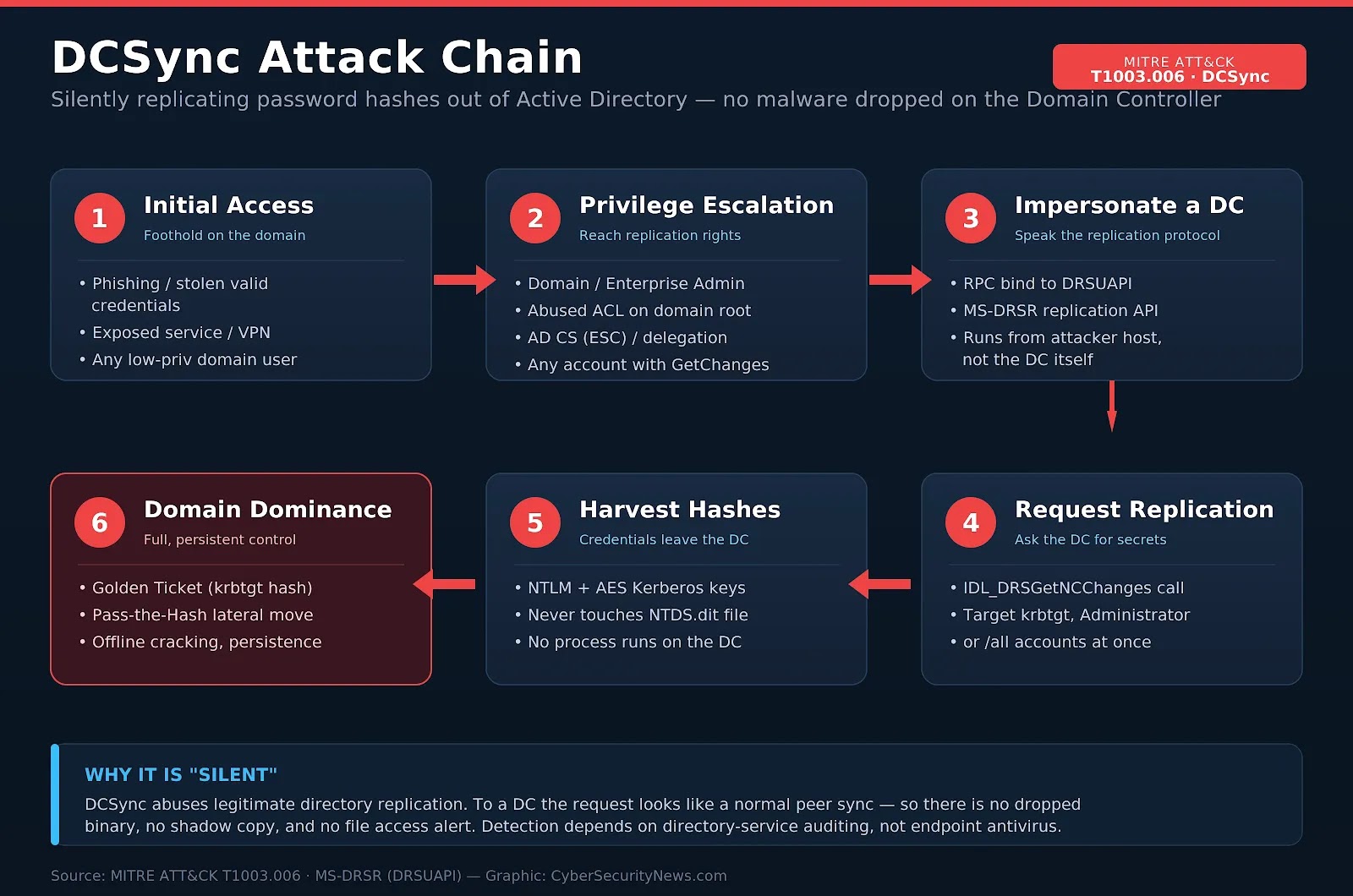
Why DCSync Is So Silent and So Dangerous
Most credential-theft techniques leave loud footprints. Dumping LSASS spawns suspicious process access; stealing NTDS.dit off a domain controller usually means creating a Volume Shadow Copy, copying a locked database, and grabbing the SYSTEM hive — all of which touch disk and trip endpoint alarms. DCSync sidesteps every one of those tells.
Because the request rides the same replication channel that domain controllers legitimately use, it looks like routine directory synchronization to the target DC. There is no binary to quarantine, no shadow copy to flag, and no file-access alert.
The attack runs entirely from the attacker’s own workstation, so the domain controller never executes attacker code. Detection therefore depends almost entirely on directory-service auditing and network telemetry rather than traditional antivirus.
The impact is severe because DCSync hands over the krbtgt account hash. With it, an attacker can forge Golden Tickets self-minted Kerberos tickets that grant access as any user, to any service, for as long as the krbtgt key stays unchanged.
That is effectively a persistent, domain-wide compromise from a single replication request. The same hashes fuel Pass-the-Hash lateral movement and offline password cracking. It is the same catastrophic outcome as an NTDS.dit database theft but far quieter.
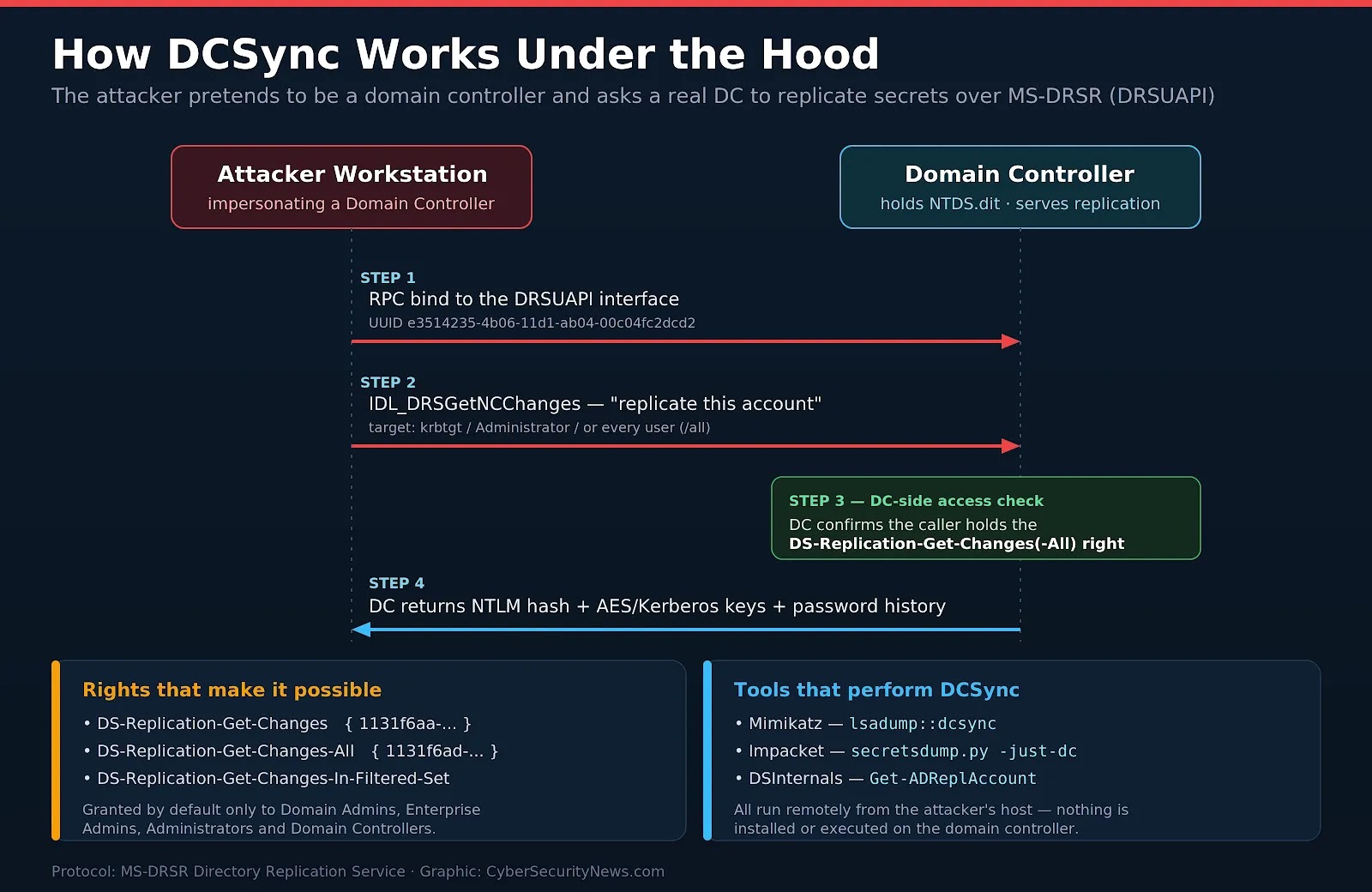
How DCSync Works Under the Hood
A DCSync operation is a short, well-defined exchange. Understanding each step tells a defender exactly where the detectable artifacts appear.
- Step 1 — RPC bind. The attacker binds to the DRSUAPI interface (UUID e3514235-4b06-11d1-ab04-00c04fc2dcd2) on a target domain controller.
- Step 2 — Replicate request. It calls IDL_DRSGetNCChanges asking the DC to replicate the secret attributes of a chosen object — commonly krbtgt, a Domain Admin, or every account at once.
- Step 3 — Access check. The DC verifies the caller holds the DS-Replication-Get-Changes(-All) extended rights. If it does, the request is treated as legitimate peer replication.
- Step 4 — Secrets returned. The DC returns the NTLM hash, AES/Kerberos keys, LM hash (if present), and password history for the requested account(s).
The replication rights that make it possible
DCSync hinges on two extended rights on the domain naming context. An attacker needs both Get-Changes and Get-Changes-All: the first authorizes replication, the second unlocks the confidential attributes (password hashes) within it.
| Extended right | Schema GUID | What it grants |
|---|---|---|
| DS-Replication-Get-Changes | 1131f6aa-9c07-11d1-f79f-00c04fc2dcd2 | Replicate directory changes for a naming context |
| DS-Replication-Get-Changes-All | 1131f6ad-9c07-11d1-f79f-00c04fc2dcd2 | Replicate secret/confidential attributes, including password hashes |
| DS-Replication-Get-Changes-In-Filtered-Set | 89e95b76-444d-4c62-991a-0facbeda640c | Replicate the RODC filtered attribute set (often abused together with the above) |
By default, these rights are held only by Domain Admins, Enterprise Admins, Administrators, and Domain Controllers.
The problem is drift: mail connectors, Entra Connect / Azure AD Sync, backup software, and legacy migration accounts are frequently granted these rights and then forgotten, turning an ordinary service account into a DCSync launchpad.
Unmanaged ACLs like these are among the most common Active Directory misconfigurations that lead to full domain compromise.
What an Attacker Needs First (Prerequisites)
DCSync is not an initial-access technique it is what an attacker reaches for after gaining a suitable identity. The realistic paths to a DCSync-capable account include:
| Prerequisite path | How attackers get there |
|---|---|
| Privileged group membership | Compromise a Domain Admin / Enterprise Admin / Administrator account via phishing, credential reuse, or LSASS dumping. |
| Abused ACL on the domain head | Find a lower-privileged account that was mistakenly granted Get-Changes-All (e.g., via BloodHound) and take it over. |
| AD CS abuse (ESC1–ESC8) | Exploit a vulnerable certificate template to obtain a certificate for a privileged account, then authenticate as it. |
| Coercion + NTLM relay | Coerce a DC or privileged host and relay the authentication to escalate to replication rights. |
| Delegation / dMSA abuse | Leverage constrained/unconstrained delegation or newer dMSA weaknesses in Windows Server 2025 to impersonate a high-privilege account. |
Several of these paths are active, real-world techniques covered in depth by Cyber Security News — including authentication coercion attacks, MITM6 + NTLM relay, and the dMSA attack on Windows Server 2025.
DCSync Attack Techniques, Tools & Commands
Once an attacker controls a principal with replication rights, executing DCSync is trivial. Below are the tools defenders will see referenced in threat reports, with representative commands.
1. Reconnaissance — find who can DCSync
Before (or instead of) escalating to Domain Admin, attackers enumerate which principals already hold replication rights. Defenders should run the same query proactively.
| # PowerView — list principals with replication rights on the domain headGet-ObjectAcl -DistinguishedName “DC=corp,DC=local” -ResolveGUIDs | ? { ($_.ObjectAceType -match “Replication-Get-Changes”) } | select SecurityIdentifier, ActiveDirectoryRights, ObjectAceType # BloodHound: shortest path to “GetChangesAll” edges highlights DCSync paths |
2. Mimikatz — the classic
Mimikatz’s lsadump::dcsync module runs on Windows and can target one account or the whole domain.
| mimikatz # lsadump::dcsync /domain:corp.local /user:krbtgt[DC] ‘corp.local’ will be the domain[DC] ‘DC01.corp.local’ will be the DC serverObject RDN : krbtgtHash NTLM : 5f4dcc3b5aa765d61d8327deb882cf99Kerberos AES256 : e0c3a1b2… (truncated) # Dump every account at once:mimikatz # lsadump::dcsync /domain:corp.local /all /csv |
3. Impacket secretsdump.py — remote and agentless
Impacket’s secretsdump.py performs DCSync entirely over the network from Linux with the -just-dc flag — no code runs on the DC. Impacket is bundled with Kali and is regularly upgraded with new attack paths.
| $ secretsdump.py -just-dc corp.local/backupadm:’P@ssw0rd’@10.0.0.10[*] Dumping Domain Credentials (domain\uid:rid:lmhash:nthash)Administrator:500:aad3b435b51404ee…:5f4dcc3b5aa765d6…:::krbtgt:502:aad3b435b51404ee…:8f3d1e6b0c9a44f2…::: # NTLM hashes only: secretsdump.py -just-dc-ntlm corp.local/backupadm@10.0.0.10# Pass-the-hash auth: secretsdump.py -just-dc -hashes :<nthash> corp.local/backupadm@10.0.0.10 |
4. DSInternals — native replication API in PowerShell
DSInternals uses the same replication protocol from PowerShell, which can blend in with administrative activity.
| Get-ADReplAccount -All -Server dc01 -NamingContext “DC=corp,DC=local”Get-ADReplAccount -SamAccountName krbtgt -Server dc01 -NamingContext “DC=corp,DC=local” |
| Tool | Platform | Representative command |
|---|---|---|
| Mimikatz | Windows | lsadump::dcsync /user:krbtgt |
| Mimikatz (full dump) | Windows | lsadump::dcsync /all /csv |
| Impacket secretsdump | Linux / Python | secretsdump.py -just-dc dom/u:p@DC |
| Impacket (NTLM only) | Linux / Python | secretsdump.py -just-dc-ntlm … |
| DSInternals | PowerShell | Get-ADReplAccount -All -Server dc01 |
| PowerView (recon) | PowerShell | Get-ObjectAcl … -ResolveGUIDs |
From Hashes to Full Domain Takeover
DCSync is the credential-access step; the damage comes from what those hashes unlock. Defenders should treat a confirmed DCSync as a domain-wide compromise, not a single-account incident.
- Golden Ticket (T1558.001): the krbtgt hash lets attackers forge Kerberos TGTs for any identity, granting stealthy, long-lived domain access until krbtgt is rotated twice.
- Pass-the-Hash & Overpass-the-Hash (T1550.002): NTLM hashes authenticate laterally without cracking; AES keys enable Kerberos-based movement.
- Offline cracking: weaker NTLM hashes fall to hashcat, and legacy NTLMv1 can be broken with rainbow tables.
- Ransomware staging: crews routinely DCSync, then push encryptors domain-wide from the DC via GPO or RDP.
For real intrusion context, see how attackers exfiltrate NTDS.dit for full AD access and how they exploit domain controllers to deploy ransomware over RDP.
Indicators of Compromise (IOCs)
Because DCSync leaves no file on the domain controller, its indicators live in directory-service audit logs, network flows, and AD configuration. Hunt for the following.

| Indicator | Type | Why it matters |
|---|---|---|
| Event ID 4662 with Access Mask 0x100 + a replication GUID, from a non-DC principal | Directory audit log | Single highest-confidence DCSync signal |
| 1131f6aa-9c07-11d1-f79f-00c04fc2dcd2 | Property GUID | DS-Replication-Get-Changes seen in 4662 Properties |
| 1131f6ad-9c07-11d1-f79f-00c04fc2dcd2 | Property GUID | DS-Replication-Get-Changes-All — returns password data |
| 89e95b76-444d-4c62-991a-0facbeda640c | Property GUID | Get-Changes-In-Filtered-Set — often paired in attacks |
| DRSUAPI UUID e3514235-4b06-11d1-ab04-00c04fc2dcd2 from a non-DC IP | Network / RPC | DRSGetNCChanges sourced from a workstation |
| Replication request whose source account is a user or workstation | Behavioural | Only DCs should perform replication |
| New/unexpected ACE granting Get-Changes-All on the domain head | AD configuration | Attacker persistence or DCSync setup (watch Event 5136) |
| Mimikatz / secretsdump artifacts on a non-DC host | Host artifact | Tooling runs on the attacker system, not the DC |
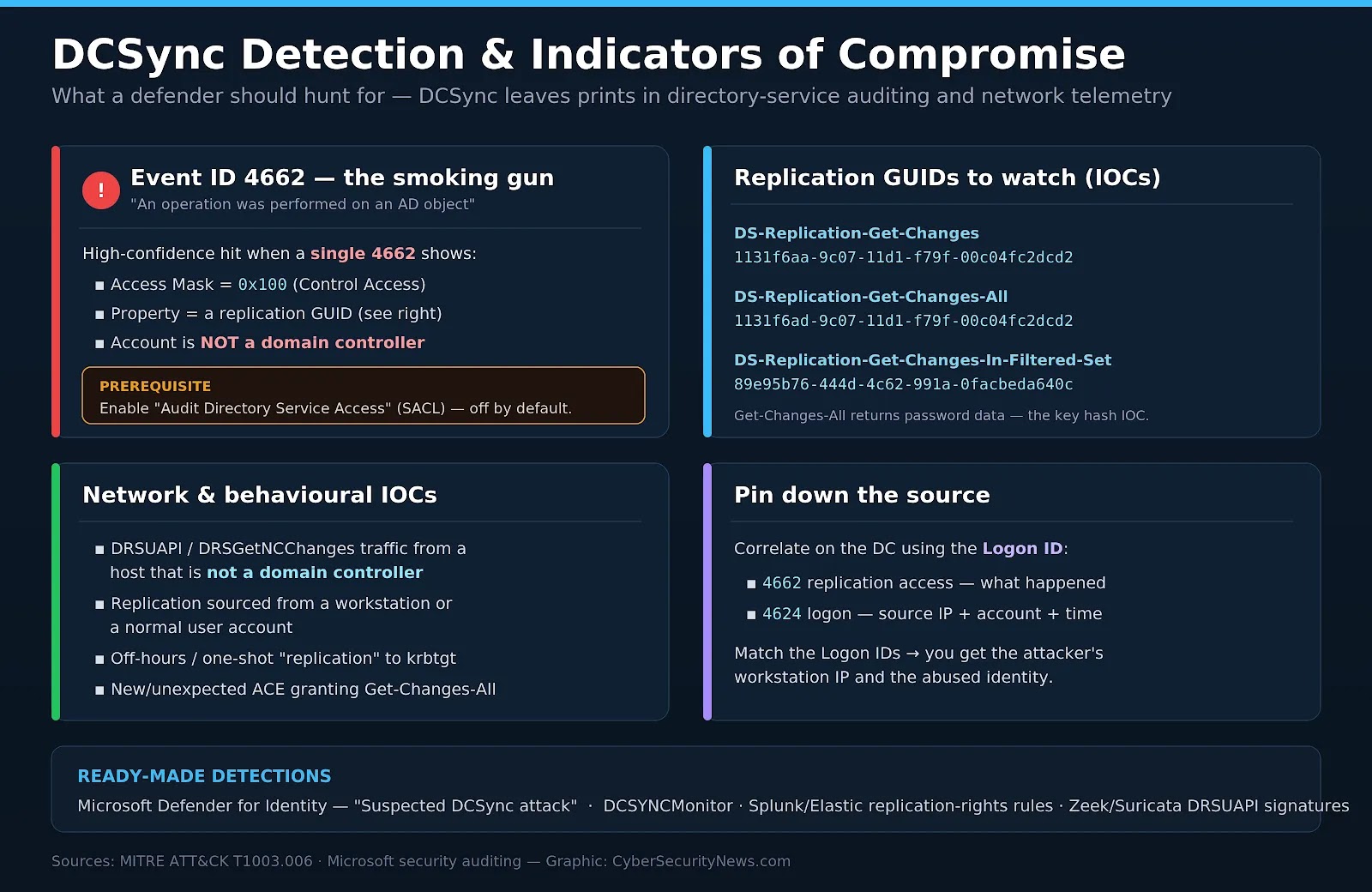
How to Detect a DCSync Attack
Event ID 4662 — the primary signal
The core detection is Windows Security Event ID 4662 (“An operation was performed on an Active Directory object”). A single 4662 that shows Access Mask 0x100 (Control Access) together with one of the replication GUIDs and whose subject is NOT a domain controller is a high-confidence DCSync hit. Crucially, this requires “Audit Directory Service Access” to be enabled (with an appropriate SACL); it is off by default.
| # Sigma / SIEM logic for DCSyncSELECT * FROM SecurityLogWHERE EventID = 4662 AND AccessMask = “0x100” AND Properties MATCHES (“1131f6aa-9c07-11d1-f79f-00c04fc2dcd2” OR “1131f6ad-9c07-11d1-f79f-00c04fc2dcd2”) AND SubjectUserName NOT IN (<list of domain controller computer accounts$>)=> ALERT: Possible DCSync (credential replication by non-DC) |
Pin down the source account and IP
Event 4662 tells you what happened, but not where from. Correlate it with Event ID 4624 (logon) on the same domain controller using the shared Logon ID.
Matching the two events reveals the attacker’s source IP, the abused identity, and the exact time turning a detection into an actionable investigation. For a wider approach, see detecting unauthorized access attempts in Active Directory.
Network and platform detections
- Network/NDR: alert on DRSUAPI (DRSGetNCChanges) traffic sourced from any host that is not a domain controller — Zeek and Suricata have community signatures for this.
- Microsoft Defender for Identity ships a built-in “Suspected DCSync attack (replication of directory services)” alert with no manual SACL tuning required.
- Open-source DCSYNCMonitor generates custom Windows events for DCSync and DCShadow activity.
- Watch Event ID 5136 for ACL changes that add replication rights — a common persistence and setup step, and the tell for the related DCShadow technique.
| Event ID | Meaning | Relevance to DCSync |
|---|---|---|
| 4662 | Operation performed on an AD object | Primary detection (needs Directory Service Access auditing) |
| 4624 | Successful account logon | Correlate by Logon ID to get source IP + account |
| 5136 | Directory service object modified | Detects ACEs granting replication rights (DCShadow setup) |
| 4742 | Computer account was changed | Rogue DC registration used by DCShadow |
| 4928 / 4929 | AD replica naming context established | Anomalous replication source/destination |
MITRE ATT&CK Mapping
| Tactic | Technique | ID |
|---|---|---|
| Credential Access | OS Credential Dumping: DCSync | T1003.006 |
| Credential Access | OS Credential Dumping: NTDS (related) | T1003.003 |
| Persistence / Defense Evasion | Rogue Domain Controller (DCShadow) | T1207 |
| Credential Access | Steal or Forge Kerberos Tickets: Golden Ticket | T1558.001 |
| Lateral Movement | Use Alternate Authentication Material: Pass the Hash | T1550.002 |
How to Prevent a DCSync Attack — Defender Checklist
You cannot disable replication — Active Directory depends on it. Defense is about shrinking who can replicate secrets, watching every replication request, and limiting the blast radius if one succeeds. Work through the checklist below.

Harden — reduce who can DCSync
- Audit replication ACLs: enumerate every principal with Get-Changes / Get-Changes-All on the domain head using BloodHound, PingCastle, or Purple Knight.
- Strip rights from non-DC accounts: no user or service account outside Tier 0 should hold Get-Changes-All. Remove legacy sync/backup grants.
- Lock down privileged groups: minimize Domain Admins, Enterprise Admins, and Administrators membership; review it continuously.
- Enforce a Tier 0 model: administer DCs only from Privileged Access Workstations; never expose DA credentials to user-tier hosts.
- Close escalation paths: remediate AD CS misconfigurations (ESC1–ESC8), unconstrained delegation, and weak object ACLs.
- Modernise credentials: adopt gMSA and LAPS; disable legacy NTLM where feasible to cut Pass-the-Hash value.
Detect & contain the blast radius
- Turn on directory auditing: enable “Audit Directory Service Access” and alert on Event 4662 + replication GUIDs from non-DCs.
- Deploy identity threat detection: Microsoft Defender for Identity (“Suspected DCSync”) and/or DCSYNCMonitor.
- Watch the wire: alert on DRSUAPI / DRSGetNCChanges from any non-DC source IP via your NDR/IDS.
- Segment and restrict RPC: permit replication DC-to-DC only and network-isolate domain controllers.
- Rotate krbtgt twice: immediately after any Domain Admin compromise to invalidate forged Golden Tickets.
- Hunt assuming breach: reset exposed privileged credentials and hunt for Golden Ticket and Pass-the-Hash usage.
Related Coverage from Cyber Security News
- Active Directory Attack Kill Chain Checklist & Tools List — 2026
- Hackers Compromise Active Directory to Steal NTDS.dit for Full Domain Compromise
- Hackers Exfiltrating NTDS.dit File to Gain Full Active Directory Access
- Most Common Active Directory Misconfigurations That Lead to Cyber Attacks
- Detecting Unauthorized Access Attempts in Active Directory Systems
- Authentication Coercion Attack Tricks Windows Machines into Revealing Credentials
- New MITM6 + NTLM Relay Attack Lets Attackers Compromise Entire Domain
- Impacket Tool in Kali Repo Upgraded With New Attack Paths and Relay Tricks
- New Attack Exploits dMSA in Windows Server 2025 to Compromise Any AD User
- Hackers Exploiting Domain Controller to Deploy Ransomware Using RDP
Frequently Asked Questions
Not by default. DCSync requires the DS-Replication-Get-Changes and DS-Replication-Get-Changes-All rights, which ordinary users lack. However, misconfigured ACLs regularly grant those rights to service or migration accounts, so a “normal” account can sometimes DCSync — which is exactly why auditing replication ACLs is essential.
No. That is what makes it silent. The tooling (Mimikatz, secretsdump, DSInternals) runs on the attacker’s own machine and requests replication over the network. The DC only sees an inbound replication request, not a running process.
The outcome is similar — both yield domain password hashes — but the method differs. NTDS.dit theft copies the physical database (usually via Volume Shadow Copy) and decrypts it offline, touching disk and leaving host artifacts. DCSync replicates the same secrets over the wire with no file access.
DCSync pulls data out by requesting replication. DCShadow (T1207) does the reverse: it registers a rogue domain controller to push malicious changes into AD (for example, adding replication rights or SID history). They are often used together.
DCSync pulls data out by requesting replication. DCShadow (T1207) does the reverse: it registers a rogue domain controller to push malicious changes into AD (for example, adding replication rights or SID history). They are often used together.
DCSync turns Active Directory’s own replication machinery into a credential-exfiltration tool. It is fast, remote, and quiet a single request can hand an attacker the krbtgt hash and, with it, indefinite control of the domain.
Because it leaves no malware and never touches NTDS.dit, endpoint antivirus will not save you. The defensible posture is a combination of least privilege on replication rights, disciplined tiering of privileged accounts, always-on directory and network auditing tuned to the replication GUIDs, and a rehearsed krbtgt-rotation and containment plan.