A new wave of job scams is hitting Web3 developers who are simply looking for their next role.
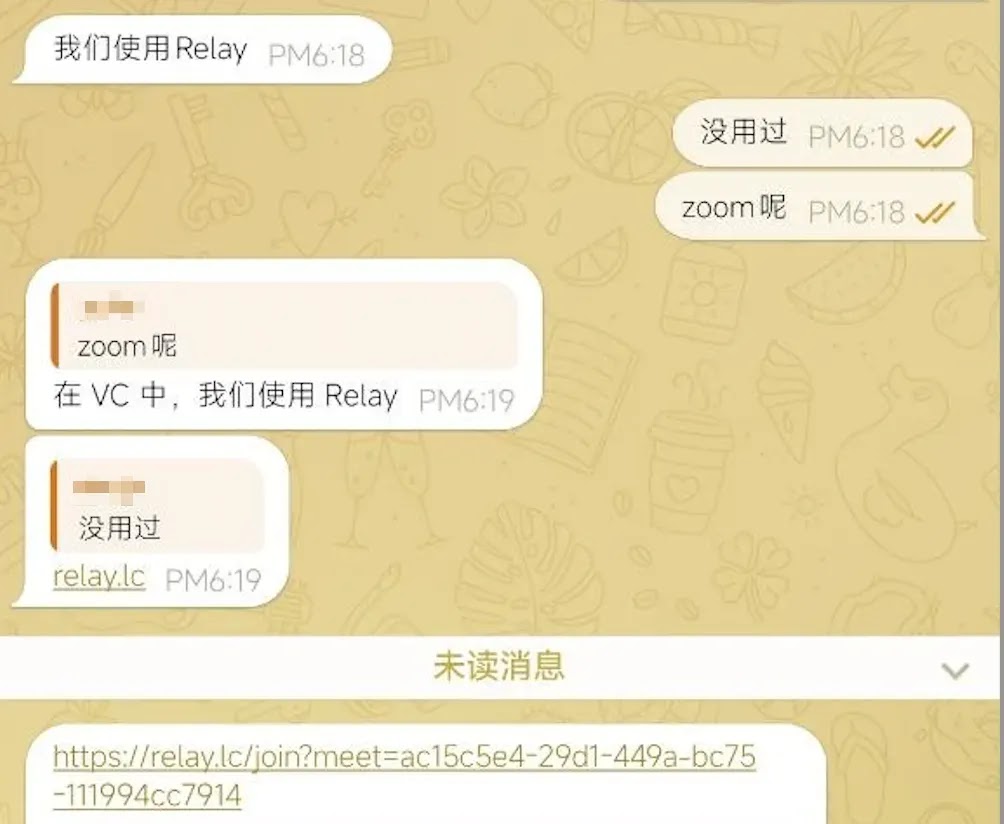
Attackers pose as recruiters, start friendly chats about interviews, and then steer candidates toward a fake meeting tool that feels completely normal for remote hiring.
The lure looks polished. Victims are told to install “Relay,” billed as an AI meeting app with notes, transcripts, and desktop clients for Windows and macOS.
After that second contact stage, analysts from SlowMist identified the site and installers as a carefully built info-stealing campaign aimed at crypto and blockchain talent.
SlowMist said in a report shared with Cyber Security News (CSN) that once the fake app runs, it reaches for browser passwords, wallet extensions, Telegram sessions, notes, and system details that can open the door to real financial loss.
The impact stretches past a single stolen login. One infected laptop can expose personal wallets, work accounts, and any secrets a developer keeps in everyday tools.
Similar fake job interview traps have already shown how quickly trust in hiring workflows can turn into a full device compromise.
Fake Recruiters Target Web3 Developers
Attackers begin with messages about interview schedules and then send candidates to relay.lc.
The site markets itself as a modern collaboration platform, so asking someone to install a meeting client before the next round rarely raises alarms.
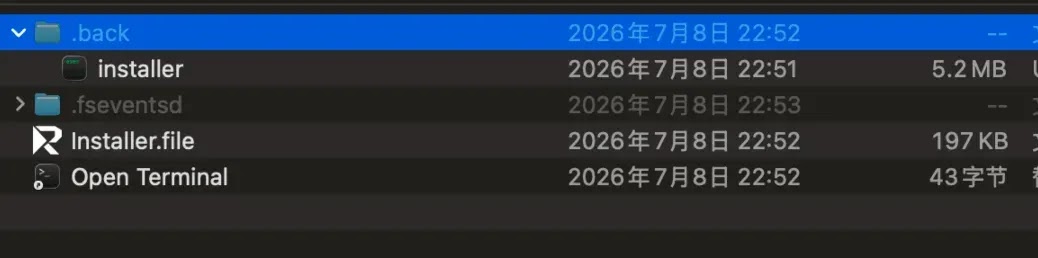
On macOS, victims are told to open Terminal, drag a file in, and press Enter. That step quietly copies a hidden program, strips safety markers, and launches it in the background. There is no real app bundle inside the disk image, only a concealed payload.

On Windows, the installer shows a slow “Updating” bar that has nothing to do with real progress.
When it hits about 80 percent, the code tries to start an unsigned helper with admin rights and a hidden window. Both paths are tuned to habits people already accept during remote hiring.
This pattern sits alongside other campaigns that push malicious npm packages or coding tests through trusted developer channels.
The shared idea is simple: borrow the trust people place in normal work tools, then deliver stealer code under that cover.
Dual-Platform Data Theft Methods
The macOS payload can pop a fake “Application Error” box that asks for the system password.
At the same time it reads the login Keychain file, then prepares both the typed password and the Keychain data for upload.
It also hunts browser stores, crypto wallet extensions, Telegram data, and Apple Notes where seed phrases sometimes sit.
The Windows side first tries to stay alive after reboot by planting copies and startup entries under names that look like system updates. It then scans Chrome and Brave extension process memory for wallet unlock material and sends the results outbound.
Browser cookies, tokens, and desktop wallet clues are also in scope. Neither chain needs a brand-new software flaw. Users are guided into running the code themselves.
Related macOS job scams have used the same social pressure around interviews to land remote access tools and stealers.
If a file was only downloaded, delete it and empty Trash or Recycle Bin, then block the listed domains and hashes.
If the macOS sample ran, disconnect the network without rebooting first, change the login and Apple ID passwords from a clean device, revoke browser and Telegram sessions, and move wallet assets with fresh keys.
If the Windows sample ran, isolate the host, remove the planted update-style files and startup entries after preserving evidence, rotate credentials from a clean machine, and plan a full OS reinstall when infection is confirmed.
Teams watching recruiters attacking developers should treat unsolicited install requests as hostile until proven safe.
Indicators of Compromise (IoCs):-
| Type | Indicator | Description |
|---|---|---|
| Domain | relay.lc | Fake Relay meeting site used in the lure |
| Domain | e1.cdnresolver.com | Command and data exfiltration host |
| Domain | a2.cdnresolver.com | Alternate remote endpoint |
| Domain | cdnresolver.com | Parent domain for C2 infrastructure |
| URL | https://e1.cdnresolver.com/m/test | macOS sample test/check endpoint |
| URL | https://a2.cdnresolver.com/m/test | Secondary macOS test endpoint |
| URL | https://e1.cdnresolver.com/lk/p1 | Windows POST path for stolen parameters |
| SHA256 | 6bc9378366076a028365ecff61ab868fe51bf988c18588c29c393a5488eafe0c | Relay.dmg malicious disk image |
| SHA256 | 271ed218b2a3fddd38529c3730491078a7737afa5f78b873592a2946fb86ab2e | Installer.file macOS shell script |
| SHA256 | e434755827e48f4e0693c83aa51b99e4600d5b0e625da1e80963b783a78de070 | Hidden macOS installer executable |
| SHA256 | 4a7ef5aec036dc7cff3eeece774caa2500bcd9f3d7712799637dab2645dfc265 | Relay.exe Windows installer |
| SHA256 | 64fa024e0563eb6fa06cb6437c76a652021a93dff78979496b4b005e61639e78 | updater.exe Windows payload |
| SHA256 | cd7500d51c200fe0493f16d8870d79359faf9ba9b121d453b28f871ec252579d | callsoul.exe persistence and memory scanner |
| Filename | Relay.dmg | macOS delivery disk image |
| Filename | Installer.file | macOS launch script |
| Filename | installer | Hidden macOS payload binary |
| Filename | Relay.exe | Windows NSIS/Electron installer |
| Filename | updater.exe | Elevated Windows stealer stage |
| Filename | callsoul.exe | Embedded Windows persistence module |
| Filename | sysupdwin.exe | Persistence copy path under AppData |
Note: IP addresses and domains are intentionally defanged (e.g., [.]) to prevent accidental resolution or hyperlinking. Re-fang only within controlled threat intelligence platforms such as MISP, VirusTotal, or your SIEM.